
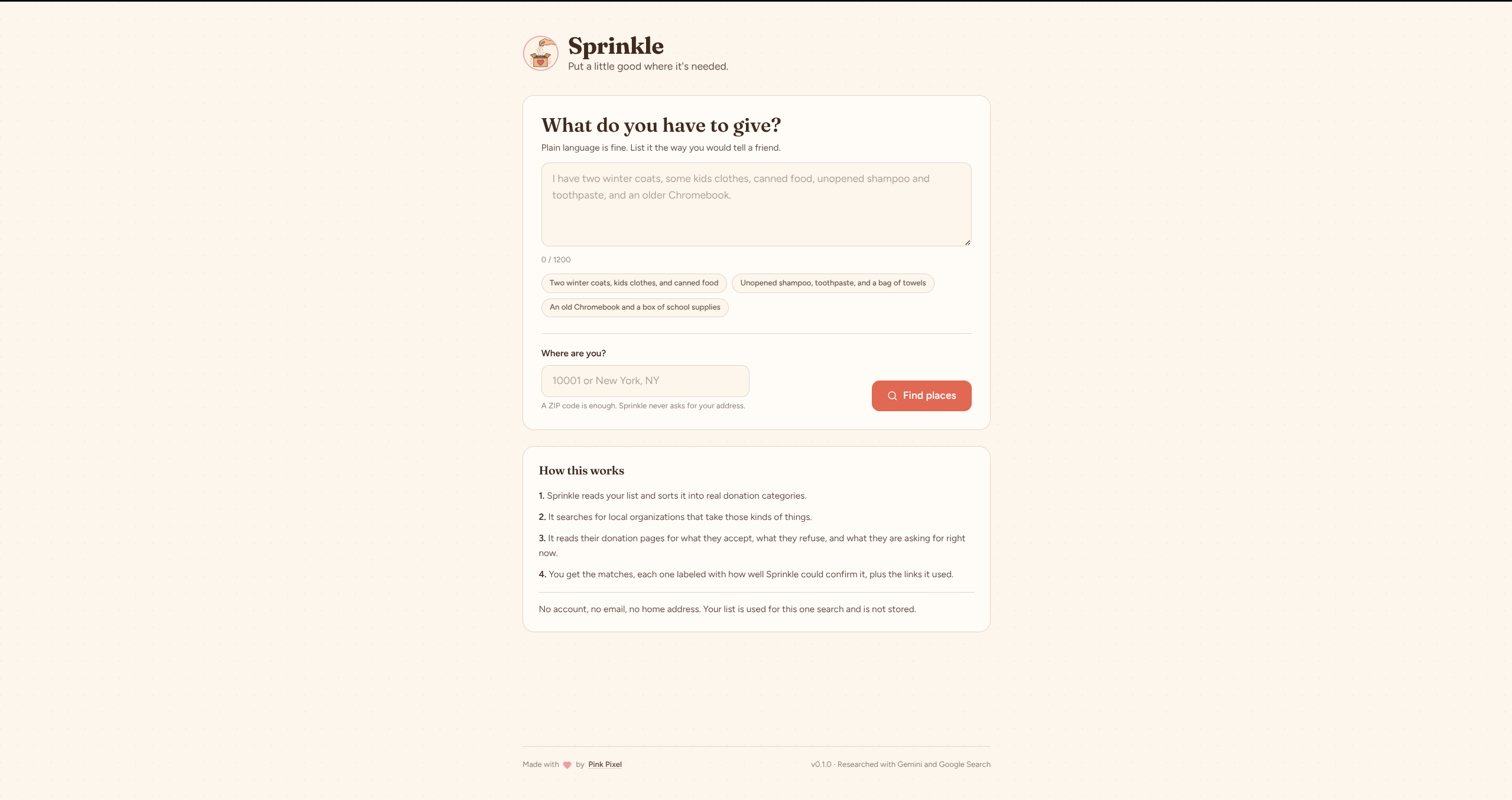
Sprinkle is a small web app that answers one question: I have this stuff, who nearby can actually use it?
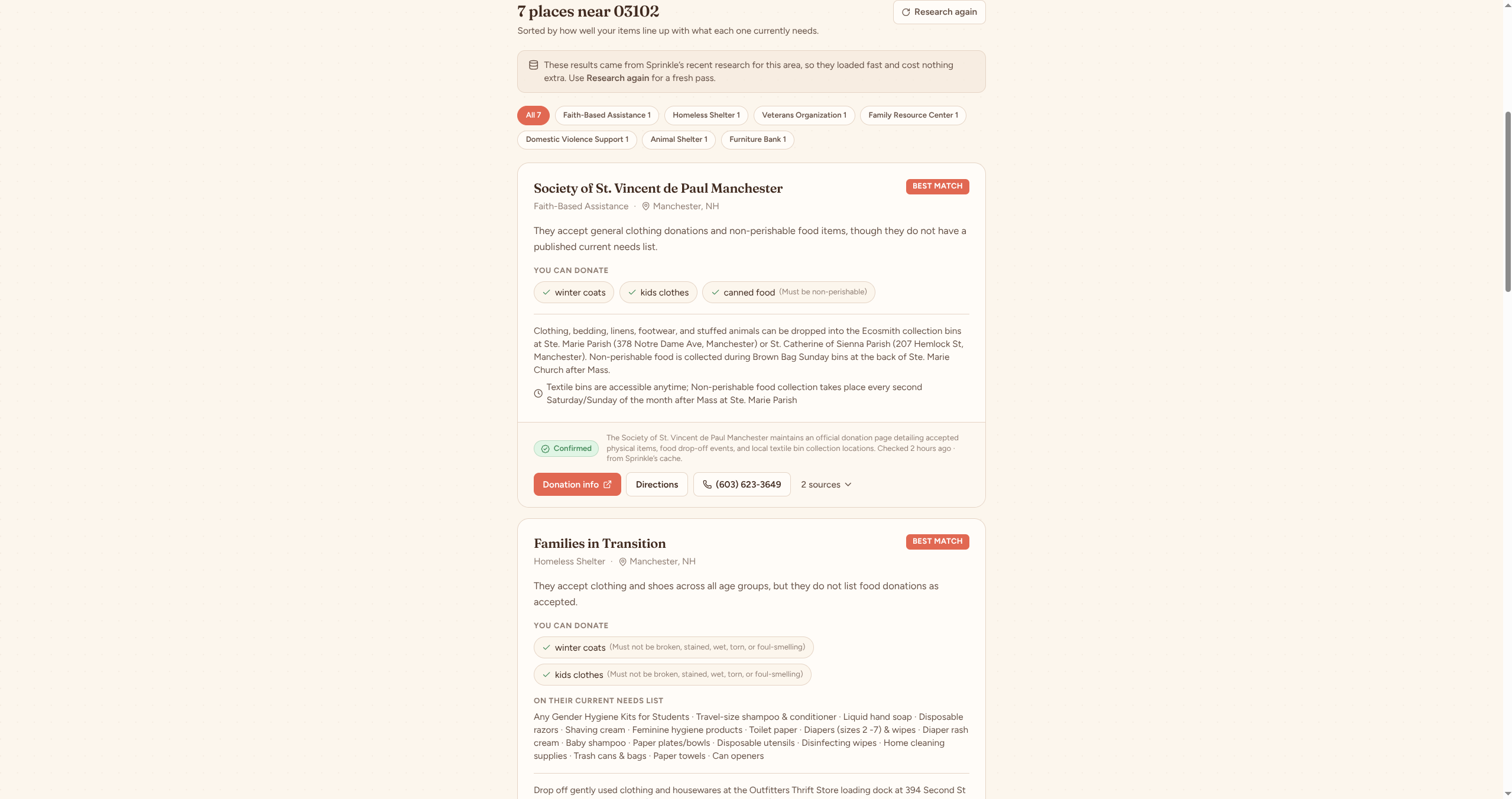
You type what you want to donate in plain language, give it a ZIP code, and it goes looking. It finds local organizations, reads their donation pages, pulls out what they accept and what they refuse, checks whether they have a current needs list, and matches that against your items. Every claim comes back with a confidence label and the links it used, so you can check the work yourself.
Try it: sprinkle.pinkpixel.dev
Donating things is more annoying than it should be. Different places take different items, some only want certain things at certain times, and current needs are usually buried on a website, a Facebook post, or a wish list nobody links to. So people either drive around guessing or give up and throw good things away.
Sprinkle was built for the DEV Weekend Challenge: Generosity Edition. It comes out of real experience with local charities, food pantries, and clothing programs, on both sides of that exchange.
- Reads a freeform donation description and turns it into structured items with categories and conditions
- Searches for local organizations that plausibly want those specific items, across pantries, shelters, clothing closets, tech reuse programs, and more
- Reads each organization's own donation page for accepted items, refused items, drop-off details, and hours
- Pulls current needs lists and wish lists when an organization publishes one
- Matches your items against each organization and sorts by fit
- Labels every organization Confirmed, Likely, Call first, or Unknown, and says why in one sentence
- Shows the source links behind each result
- Streams live progress while the research runs, since a full pass takes a bit
- Caches research per area so repeat searches are fast and cheap
No account. No email. No home address. A ZIP code is enough.


Four stages, three of them Gemini calls:
- Parse.
gemini-3.5-flash-liteturns your description into structured items. Cheap and fast, low thinking. - Discover.
gemini-3.7-flashwith Google Search grounding finds candidate organizations near your location. Results are cached per area for 5 days. - Research. The same model, now with Google Search plus the URL context tool, investigates organizations in batches of three. It reads their actual pages and reports only what it can attach a source to. Cached per organization for 36 hours.
- Match. One more call compares your items against each organization's policy. Scoring and ranking happen locally in TypeScript, so the ordering is deterministic and explainable.
The whole thing runs on a Cloudflare Worker that also serves the built React app. Your Gemini key never touches the browser.
| Label | What it means |
|---|---|
| Confirmed | The organization's own current page states the policy |
| Likely | A credible third party documents it, but the organization's own site did not confirm it |
| Call first | The organization is real and relevant, but the donation information is thin, old, or contradictory |
| Unknown | No usable donation policy was found |
An organization marked Call first or Unknown always sorts into the "Call first" tier, no matter how well the items line up on paper. Sprinkle would rather send you to a phone than to a locked door.
You need Node 22 or newer, a Gemini API key, and a Cloudflare account if you want to deploy.
npm installPut your key in a local secrets file:
cp .dev.vars.example .dev.varsThen edit .dev.vars and set GEMINI_API_KEY. That file is git-ignored.
wrangler.toml already has a KV namespace id in it, but it belongs to the Pink Pixel account. If you cloned this, make your own and swap it in:
npx wrangler kv namespace create SPRINKLE_CACHEThat prints an id. Put it in the [[kv_namespaces]] block in wrangler.toml.
You can skip this for local development. wrangler dev uses simulated local storage and ignores the id entirely, so the cache and rate limiting work locally either way. You need a real namespace before you deploy.
Now build the frontend and run the Worker:
npm run build
npm run dev:worker
That serves the whole app, API and UI together, at http://127.0.0.1:8787.
For frontend work with hot reload, run both:
npm run dev:worker
npm run dev
Vite serves the UI on http://localhost:5173 and proxies /api to the Worker on port 8787.
Push your key as a Worker secret first. Do not put it in wrangler.toml.
npx wrangler secret put GEMINI_API_KEY
npm run deploy
npm run deploy type-checks, builds the frontend into dist/, and uploads the Worker with dist/ as its static assets.
Set these in the [vars] block of wrangler.toml. All of them have defaults in the code, so you can delete any of them.
| Variable | Default | What it does |
|---|---|---|
GEMINI_RESEARCH_MODEL |
gemini-3.7-flash |
Model for discovery, research, and matching |
GEMINI_PARSE_MODEL |
gemini-3.5-flash-lite |
Model for reading the donation list |
MAX_ORGS_RESEARCHED |
8 |
Cap on organizations researched per search |
RATE_LIMIT_SECONDS |
30 |
Minimum seconds between searches from one IP |
GEMINI_API_KEY is a secret, not a var. Set it with wrangler secret put in production and in .dev.vars locally.
The plan for this project set a hard ceiling of $20 per month, so cost control is built in rather than bolted on.
- Caching. Research is the expensive part. Matching already-researched organizations against a new item list is cheap. Discovery results are cached per area for 5 days, research per organization for 36 hours. A second person searching the same ZIP code mostly hits cache.
- Batching. Organizations are researched three per call instead of one each, which cuts grounded search requests by roughly two thirds.
- Rate limiting. One search per IP per 30 seconds, enforced in KV.
- Hard caps. Maximum 8 organizations per search, request timeouts on every Gemini call, and length limits on both input fields.
- Low thinking on the parse and match stages, which are mechanical and do not need it.
A cold search measured at $0.032, with roughly 4 grounded search requests. Google's free tier covers 5,000 grounded requests per month, so at that rate the $20 budget runs out around 625 searches, well before grounding starts costing anything.
Worth being precise about what the rate limit does and does not do. One search per IP per 30 seconds stops runaway loops and scripted hammering. It is not a spend ceiling: a patient client at 2 searches per minute could work through $20 in about 5 hours. Set a spending cap on the Google Cloud project, since none of this replaces a real budget limit.
shared/
  types.ts          API contract shared by the Worker and the UI
worker/
  index.ts          Router, validation, rate limiting, SSE pipeline
  gemini.ts         REST client for the Gemini Interactions API
  schemas.ts        JSON schemas for structured output
  parse.ts          Stage 1: donation text into structured items
  discover.ts       Stage 2: find nearby organizations
  research.ts       Stage 3: read donation pages, extract policies
  match.ts          Stage 4: match items, score, rank
  cache.ts          KV cache for discovery and research
src/
  components/       React UI
  lib/useSearch.ts  SSE client for the search stream
- Distance is not calculated. Organizations are found near your location, but there is no geocoding and no map yet, so results are not sorted by miles.
- Research quality depends on what organizations publish. Plenty of small pantries have no website at all, and those come back as Unknown.
- Rate limiting uses KV, which is eventually consistent. Two requests landing in the same second can both get through. It is a speed bump against scripted abuse, not a hard guarantee.
- The cache is keyed on the location string as typed, so "10001" and "New York, NY" are separate cache entries even though they overlap.
- Sprinkle reads public web pages and can be wrong or out of date. That is why the verification labels exist. Call before you load up the car.
Your donation description is used for the search and is not stored. Gemini calls are sent with store: false, so they are not retained on Google's side either. The only things that persist are the research results about organizations, which are public information, and a timestamp per IP for rate limiting that expires after a minute.
React and TypeScript on the frontend, built with Vite and styled with Tailwind CSS v4. The backend is a single Cloudflare Worker calling the Gemini Interactions API over REST, with Cloudflare KV for caching. No AI SDK, since the API is a handful of fields and calling it directly keeps the Worker small.
Apache 2.0. See LICENSE.
Made with 💖 by Pink Pixel