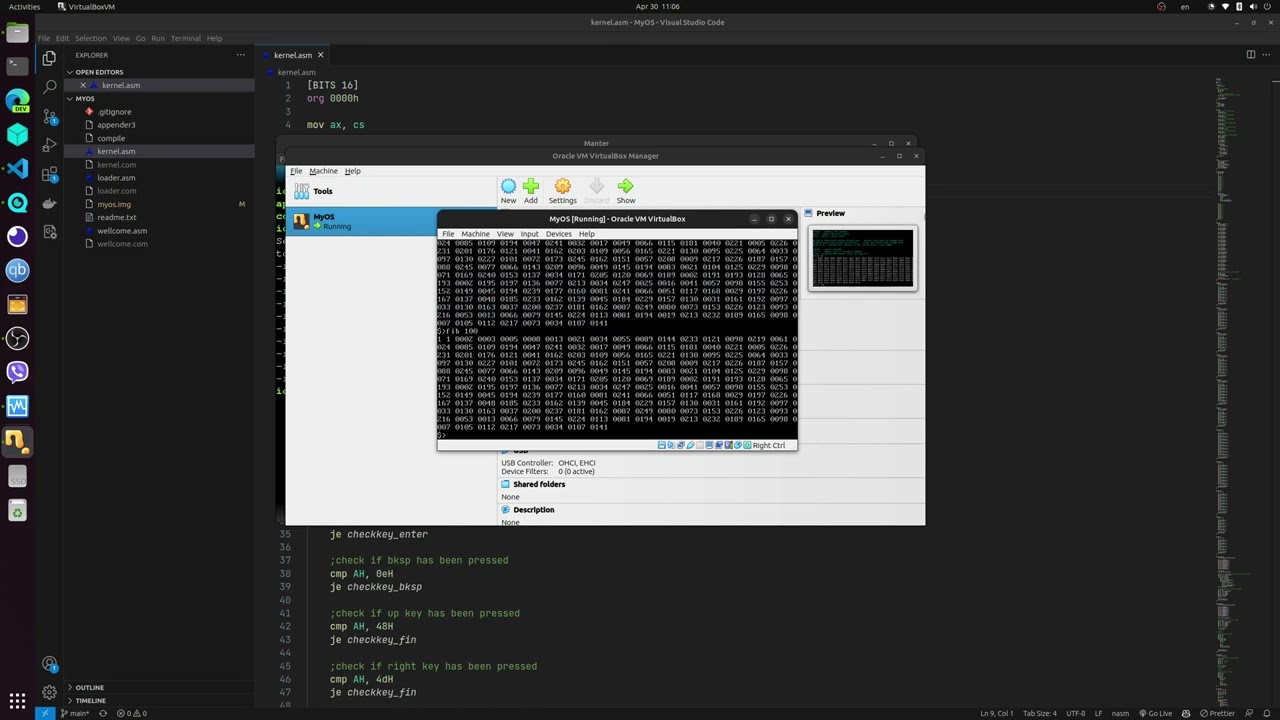
MyOS is a small 16-bit operating system written in NASM Assembly. It boots from a floppy disk image, loads a welcome screen and kernel, then provides a simple command-line interface with built-in commands for screen control, ASCII display, sound, Fibonacci calculation, timing, rebooting, and direct floppy-sector read/write operations.
This project demonstrates low-level systems programming: boot-sector loading, BIOS interrupts, manual memory/sector layout, keyboard input handling, text-mode output, and raw disk access.
Most software projects run on top of large frameworks, operating systems, and runtime environments. MyOS goes in the opposite direction: it works close to the hardware and shows an understanding of what happens before normal applications can even start.
The goal was not to build a production OS, but to understand and implement the core boot flow and basic kernel behavior from scratch.
- Custom bootloader written in 16-bit Assembly
- Bootable 1.44 MB floppy image generation
- Kernel loaded manually from disk sectors
- Text-mode command prompt
- Keyboard input handling
- Built-in shell commands
- BIOS-based screen output
- BIOS-based disk read/write operations
- Simple sound output through the PC speaker
- Animated welcome/draw screen
- Manual build pipeline using Bash and NASM
| Command | Description | |
|---|---|---|
about |
Displays information about the OS | |
help |
Lists available commands | |
clear |
Clears the screen | |
reboot |
Reboots the system | |
ascii |
Displays the ASCII table | |
beep |
Plays a short beep | |
chrono |
Starts a simple seconds counter | |
fib n: |
Prints the first n Fibonacci numbers |
|
draw |
Shows the animated UTM screen | |
| `writeflp head,track,sector,drive | size:` | Writes text data to the floppy image |
| `readflp head,track,sector,drive | size:` | Reads text data from the floppy image |
writeflp head,track,sector,drive|size:
readflp head,track,sector,drive|size:
Parameters:
| Parameter | Accepted values |
|---|---|
head |
0 or 1 |
track |
0–79 |
sector |
1–18 |
drive |
0 or 1 |
size |
Number of bytes, up to 6000 |
Example:
writeflp 0,10,2,0|100:
readflp 0,10,2,0|100:
.
├── loader.asm      # Bootloader: starts execution and loads the welcome program
├── wellcome.asm    # Welcome / animation screen
├── kernel.asm      # Main command-line kernel
├── appender3       # Creates the bootable floppy image layout
├── compile         # Builds the .com files and final image
├── myos.img        # Generated bootable floppy image
└── README.md
- Linux or WSL
- Bash
- NASM
truncate
Install NASM on Debian/Ubuntu-based systems:
sudo apt update
sudo apt install nasmchmod +x compile appender3
./compileThe build script assembles:
loader.asm   -> loader.com
wellcome.asm -> wellcome.com
kernel.asm   -> kernel.com
Then appender3 combines them into:
myos.img
You can boot the generated image with QEMU:
qemu-system-i386 -fda myos.imgIf QEMU is not installed:
sudo apt install qemu-system-x86The bootloader starts at 0x7C00, displays a loading message, waits for Enter, then uses BIOS interrupt int 13h to load the next stage from the floppy image into memory.
The kernel switches to BIOS text mode, prints a prompt, reads keyboard input through BIOS keyboard services, stores typed commands in memory, and dispatches them to command handlers.
The readflp and writeflp commands use BIOS disk services to read and write raw sectors on the same floppy image from which the OS boots.
The appender3 script creates a 1.44 MB floppy image and places the bootloader, welcome program, kernel, and metadata at specific offsets. This makes the boot process explicit and easy to study.
Through this project, I practiced:
- x86 real-mode Assembly
- BIOS interrupts
- Bootloader basics
- Kernel loading
- Memory addressing
- Keyboard and screen interaction
- Raw disk sector operations
- Shell command parsing
- Building bootable binary images manually
MyOS is an educational operating system. It does not include:
- Protected mode
- Filesystem support
- Multitasking
- Memory protection
- Drivers beyond BIOS services
- C standard library or higher-level runtime
Possible next steps:
- Add FAT12 filesystem support
- Improve command parsing
- Add error handling for disk operations
- Add a Makefile
- Add automated QEMU run command
- Move from real mode to protected mode
- Rewrite parts of the kernel in C after bootstrapping
- Add screenshots and a demo GIF
This project shows my interest in low-level programming and my ability to work below normal application layers. It demonstrates curiosity, persistence, and understanding of how software interacts with hardware during the earliest stages of execution.
While small, MyOS reflects skills that are valuable in systems programming, embedded development, debugging, performance-sensitive work, and any role where understanding computer fundamentals matters.
Ion Dodon