
We are a small research team working on local diffusion inference and fine tuning. We publish what comes out of it: the engine, the app, the LoRAs, the datasets, and the VRAM numbers we measured getting there.



Inline Studio, a free and open source canvas for AI filmmaking.
We built it after wasting too many afternoons hunting for the workflow and the assets that made a shot work. Now every shot keeps its own history. Each generation is a take you can go back to, the project saves itself as you go, and every image you make carries its whole graph inside it. Drop one back on the canvas and the pipeline comes back with it.
It all runs on your own machine: generating the shots, training your own look, and cutting the finished video. One command starts it. No account, no second service to keep running, and nothing leaves your computer unless you reach for a hosted model.
Inline Core is the engine underneath, written from scratch in Python. It runs Z-Image Turbo, Krea 2, FLUX.2 and MiniMax H3 locally from single model files, fits each one to the card it finds, and trains LoRAs for all four.
"This is the part of open source you can't fake. Someone wanted a tool that didn't exist, built it on us, and gave it to everyone."
Robin Huang, Cofounder, ComfyUI (original post)
FLUX.2, the whole family behind one node. Reference images ride in the denoiser's token sequence, so "the character from image 1 wearing the jacket from image 2" is a real capability rather than a workaround. Wire one image to edit it, or several to compose from them, and the node numbers them so the prompt can address them by position. Pick klein 4B, klein 9B, either Base build, the KV variant or dev in the sidebar and the node reads steps and guidance off the checkpoint, so swapping a distilled build for its Base moves 4 steps at guidance 1.0 to 50 at guidance 4.0 with nothing to change by hand. klein 4B is Apache 2.0, renders 1024px in four steps, and peaks near 17.9GB at bf16.
MiniMax H3 open weights, running on your own hardware. The first video model in the engine, and the first that generates a soundtrack instead of a silent clip: one transformer denoises the video and its 32kHz stereo audio in a single pass, so a take is one MP4 with sound already in it. Four nodes, because the inputs genuinely differ: text to video, image to video, first and last frame, and reference to video with up to nine images, three clips and three audio tracks addressed by position.
Making it fit was the work. A 33B transformer runs beside a 32B conditioner, so the prompt is encoded first and the conditioner steps off the card before the denoise starts. The modulation weights, 40% of the transformer, are factorised at load and take it from 66.3GB to 40.3GB. Measured on a 45GB card, a 10 second clip at 960x544 takes about 7.2 minutes and peaks at 38.9GB of VRAM and 46.7GB of system RAM. Same model is an API node if that is out of reach.
LoRA training for MiniMax H3. H3 trains on still images against the undistilled FL2VA base, then the adapter loads into any of the four video nodes. It learns look, style, character and lighting, not motion or sound, since it never sees either. The frozen base is 4-bit always, 11.7GB after quantisation. It peaks at 20.6GB on a card that can hold the conditioner, and 12.7GB on one that cannot, because the conditioner spills to the CPU and the tallest phase stops being the caption pass. A 16GB card therefore trains H3 where a 24GB card is merely comfortable, measured on a Tesla T4.
ControlNet and Control Space. Steer a local render with pose, depth or edge maps, or skip the reference photo: Control Space is a 3D pose editor in a node. Pose your characters, frame a camera, render the scene as an OpenPose skeleton or a depth map, and wire it straight into a gen node.
Worth answering before you install anything.
| Your hardware | What you get |
|---|---|
| No GPU at all | API Nodes reach hosted models, including H3. Nothing to download, works today. |
| 8 to 16 GB | Z-Image Turbo at 1024px in roughly 11.5GB. FLUX.2 klein 4B quantized. LoRA training for all four architectures at 512px. |
| 24 GB | FLUX.2 klein 4B resident at bf16, dev with a prequantized NF4 build, and comfortable LoRA training. |
| 40 GB and up | Krea 2 at full quality, MiniMax H3 video with sound, and training at 1024px. |
Training is cheaper than generating, so a Krea 2 LoRA trains at 512px inside 12GB on a card that cannot generate with the model at all.
Training is part of the app, not a separate toolchain you go and learn. The Trainer is a second canvas: a dataset node, a caption node, a Train LoRA node, a live loss graph and a resources readout, wired together. Press Start and watch it run. Hyperparameters sit in a side panel so the node itself stays a status surface, with a step counter, streaming logs and a progress bar.
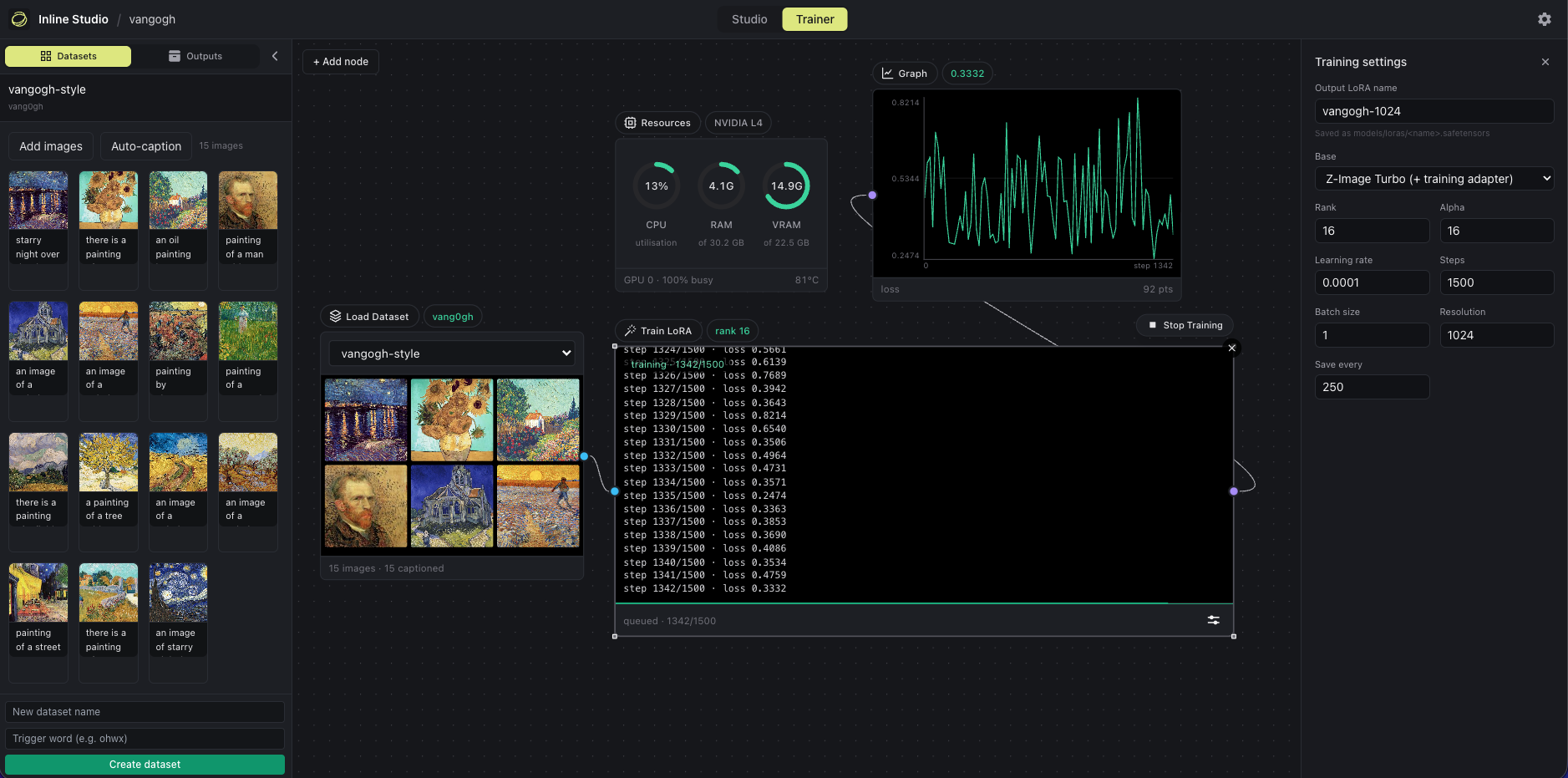
Peak VRAM at 512px, rank 16, batch 1, gradient checkpointing on:
| Architecture | 512px peak | Fits 16GB |
|---|---|---|
| FLUX.2 (klein Base 4B) | ~8.6GB | yes |
| Krea 2 (4-bit base) | ~11.9GB | yes |
| Z-Image | ~13.4GB | yes |
| MiniMax H3 (4-bit, video) | ~20.6GB | yes, slowly |
- Train on the base, generate on the fast checkpoint. The LoRA carries over unchanged, so you keep the 8-step render speed. If you only hold a Turbo checkpoint, a training adapter is fused in for the run and dropped when the LoRA is saved.
- A LoRA trained at 512px applies at any generation resolution.
- Captions are optional. Caption locally with the built-in captioner, edit by hand, or switch them off and rely on the trigger word, which works well for a single subject.
- Stop and resume. Stopping flushes a checkpoint holding adapter weights, optimizer and RNG state, and step count, so resuming picks up at the exact step. Crashed runs recover on their own.
- Straight into a render. The finished
.safetensorslands inmodels/loras/and appears in the LoRA loader node right away.
Nothing is downloaded behind your back. Training reuses the model files you already have, and if one is missing the run stops and names it.
Full walkthrough, with a worked example, measured VRAM numbers, and the settings we would start from.
Trained on that canvas, published openly, dataset included so you can reproduce the run.
- skin-lora-krea-2-raw, a skin texture LoRA for Krea 2 RAW
- krea2-skin-lora, the 26 image and caption pairs it trained on
- The same LoRA on Civitai: Krea 2 Realistic Skin Texture
Everything else we publish lands on Hugging Face and Civitai.
| Repo | What it is |
|---|---|
| Inline-Studio | The app. Node canvas, take history, timeline, LoRA trainer, and the Inline Core engine that powers it. Start here. |
| Inline-Registry | The published extension index the app's Available tab reads. |
| Inline-Studio-Extension-Guide | The reference extension, for anyone writing custom nodes. |
Releases and changelog: Inline-Studio/releases. Packages: inline-core and inline-studio-frontend on PyPI.
- Getting started guide, install to first render
- Train your own LoRA
- Projects, films made in the app
- Discord, where we answer questions and take feature requests
team@inlinestudio.art · Privacy policy
Inline Studio is licensed GPL-3.0. Copyright Inline Research.