




dir-tree turns local folders, ZIP archives, GitHub/GitLab repositories, pasted tree text, or in-memory data into a stable FileNode tree — then lets you render it as ASCII, edit it, annotate it, and export it. The core is pure and runtime-agnostic, so the same logic runs in Node.js and the browser, with no UI dependencies.
This package is the headless version of dir-tree.com — try the full app there.
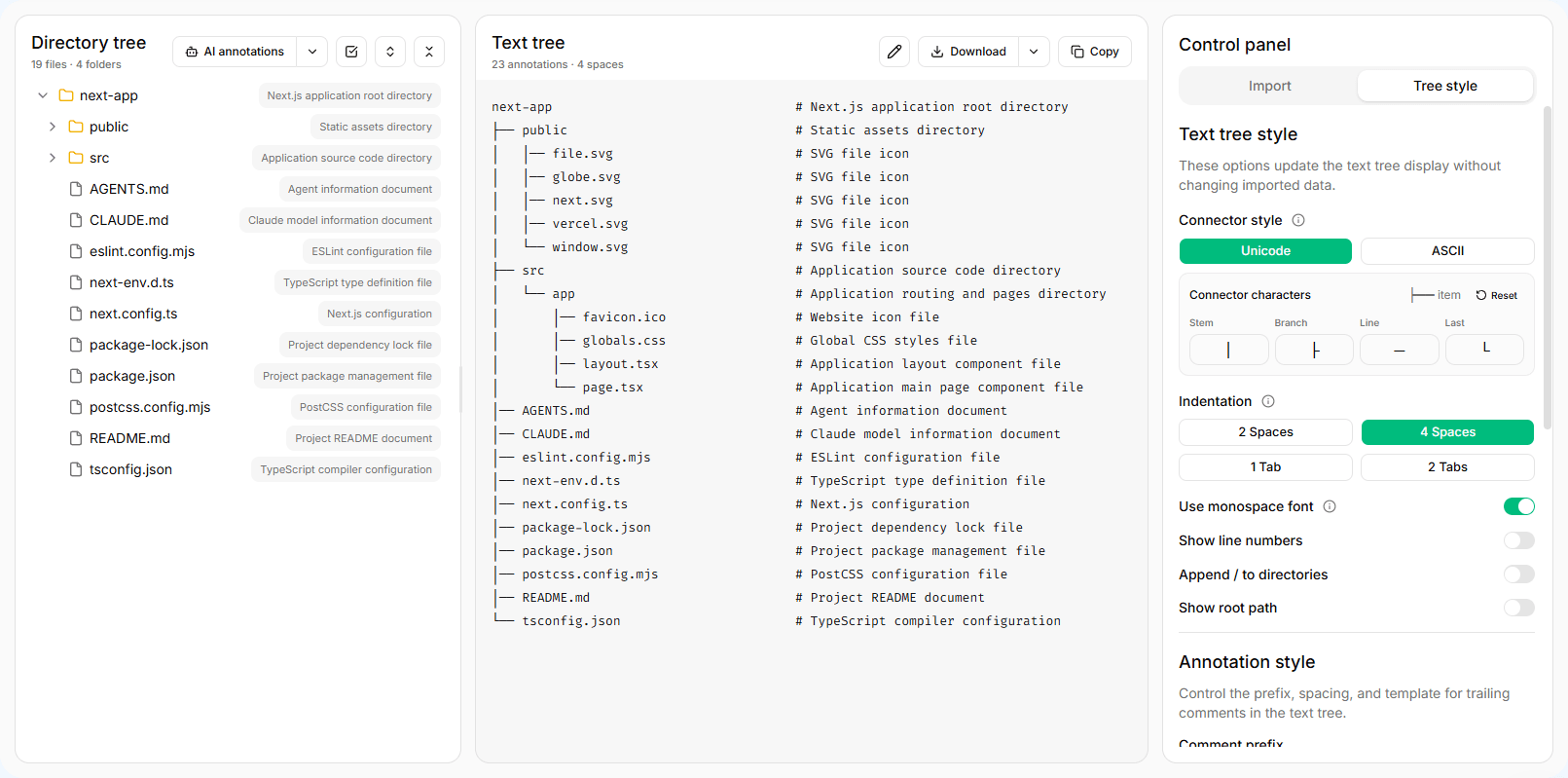
- Many sources — read local directories, ZIP archives, GitHub/GitLab repositories, imported text, or in-memory trees through a shared adapter interface
- Configurable ASCII rendering — connector styles, indentation, line numbers, full paths, and file size / modified-time metadata
- Pure tree editing — create, rename, move, delete, focus, visibility, and expansion helpers that return new trees instead of mutating your state
- Import and export — parse JSON, XML, HTML, Markdown, or ASCII tree text, and export back to JSON or ASCII
- Annotations — provider-agnostic request, diff, and patch helpers for per-node comments; bring your own AI or manual workflow
- Isomorphic and modular — tree-shakeable subpath exports, ships ESM, CommonJS, and type declarations, runs in Node.js and the browser
npm install @devmc12/dir-treeRequirements:
- Node.js
>=18.18 - TypeScript users can import types directly from the package
- The core and most adapters are isomorphic. Node.js filesystem reading is exposed from
@devmc12/dir-tree/node, and browser-only APIs are exposed from@devmc12/dir-tree/browser
import { FileSystemReader, InMemoryFileTreeAdapter } from '@devmc12/dir-tree';
import { renderAsciiTree } from '@devmc12/dir-tree/ascii';

const reader = new FileSystemReader(
  new InMemoryFileTreeAdapter({
    name: 'project',
    path: 'project',
    kind: 'directory',
    children: [
      {
        name: 'src',
        path: 'project/src',
        kind: 'directory',
        children: [
          {
            name: 'index.ts',
            path: 'project/src/index.ts',
            kind: 'file',
          },
        ],
      },
    ],
  })
);

const tree = await reader.read({
  depth: 3,
  exclude: ['node_modules', 'dist'],
  sort: { sortBy: 'name', order: 'asc', foldersFirst: true },
});

console.log(renderAsciiTree(tree));Use InMemoryFileTreeAdapter when your application already has tree-shaped data or when you need deterministic tests.
import { FileSystemReader, InMemoryFileTreeAdapter } from '@devmc12/dir-tree';

const tree = await new FileSystemReader(
  new InMemoryFileTreeAdapter({
    name: 'docs',
    path: 'docs',
    kind: 'directory',
    children: [{ name: 'api.md', path: 'docs/api.md', kind: 'file' }],
  })
).read();Use NodeFileSystemAdapter from @devmc12/dir-tree/node to read a directory path from disk in Node.js. It honors the same depth, exclude, useGitignore, readFileMeta, and sort options, and is isolated from the browser entries so bundlers never pull node:fs into client builds.
import { FileSystemReader } from '@devmc12/dir-tree';
import { NodeFileSystemAdapter } from '@devmc12/dir-tree/node';
import { renderAsciiTree } from '@devmc12/dir-tree/ascii';

const tree = await new FileSystemReader(
  new NodeFileSystemAdapter('./my-project', {
    exclude: ['node_modules', 'dist'],
    useGitignore: true,
  })
).read({ readFileMeta: true });

console.log(renderAsciiTree(tree));Use browser helpers to detect directory picker support, then read with LocalFileSystemAdapter. This is browser-only.
import { FileSystemReader, LocalFileSystemAdapter } from '@devmc12/dir-tree';
import { isNativeDirectoryPickerSupported } from '@devmc12/dir-tree/browser';

if (!isNativeDirectoryPickerSupported()) {
  throw new Error('Directory picking is not supported');
}

const handle = await window.showDirectoryPicker({ mode: 'read' });
const tree = await new FileSystemReader(
  new LocalFileSystemAdapter({}, handle)
).read({ readFileMeta: true, useGitignore: true });Use ZipFileSystemAdapter with Blob, ArrayBuffer, or Uint8Array input.
import { FileSystemReader, ZipFileSystemAdapter } from '@devmc12/dir-tree';

const response = await fetch('/fixtures/project.zip');
const tree = await new FileSystemReader(
  new ZipFileSystemAdapter(await response.arrayBuffer(), {}, 'project')
).read({ showHidden: false });Use RemoteRepositoryFileSystemAdapter for GitHub or GitLab repository trees. Pass a token when the provider needs authenticated requests, or inject a custom API client for tests and self-hosted integrations.
import {
  FileSystemReader,
  RemoteRepositoryFileSystemAdapter,
} from '@devmc12/dir-tree';

const tree = await new FileSystemReader(
  new RemoteRepositoryFileSystemAdapter({
    repositoryUrl: 'https://github.com/example/project/tree/main/src',
    token: 'github-token',
  })
).read({ depth: 4 });
The built-in fetch client follows every GitHub/GitLab branch page and every GitLab repository-tree page. GitHub tree reads keep the single recursive request fast path; when GitHub marks that response as truncated, the client discards the partial data and expands the repository through complete subtrees instead. Large imports can consume significant API quota, so prefer a token or a narrower tree URL when available.
Remote repository helper functions are exported from @devmc12/dir-tree/adapters, including URL parsing, ref/path resolution, branch resolution, provider entry mapping, and fetch client creation.
Parse imported JSON, XML, HTML, Markdown list, Markdown document, or ASCII tree text into a FileNode tree, then render it back to ASCII.
import { parseImportedTreeText } from '@devmc12/dir-tree/parser';
import {
  createAsciiTreeOptionsFromConfig,
  renderAsciiTree,
} from '@devmc12/dir-tree/ascii';

const parsed = parseImportedTreeText(
  `project
  ├── src
  └── README.md`,
  'project'
);

const ascii = renderAsciiTree(
  parsed.tree,
  createAsciiTreeOptionsFromConfig({
    connectorStyle: 'unicode',
    showLineNumbers: true,
  })
);Tree operations are pure. They return cloned trees or structured edit results without mutating host UI state.
import { createFileTreeNode, renameFileTreeNode } from '@devmc12/dir-tree/tree';

const created = createFileTreeNode(tree, 'project/src', {
  kind: 'file',
  name: 'new-file.ts',
});

const renamed = created
  ? renameFileTreeNode(created.tree, created.path, 'main.ts')
: null;Use transfer helpers when you need a serializable tree file with optional annotations and visibility state.
import {
  createExportedFileTreeJson,
  parseImportedFileTreeJson,
} from '@devmc12/dir-tree/transfer';

const json = createExportedFileTreeJson(tree, annotations, { visibility });
const restored = parseImportedFileTreeJson(json);The package does not call any AI service. It only defines provider payloads, provider results, patch normalization, and diff utilities. Your application owns model calls, tokens, quotas, storage, analytics, and notifications.
import {
  applyTreeAnnotationPatches,
  createAnnotationDiffResult,
  createAnnotationProviderRequest,
  createTreeAnnotationPatchesFromProviderResult,
  type AnnotationProvider,
  type TreeAnnotationMap,
} from '@devmc12/dir-tree/annotations';

const provider: AnnotationProvider = {
  async annotate(payload) {
    return {
      annotations: payload.nodes.map(node => ({
        path: node.path,
        comment: `Describe ${node.kind}`,
      })),
    };
  },
};

const annotations: TreeAnnotationMap = {};
const request = createAnnotationProviderRequest({ tree, annotations });
const result = await provider.annotate(request.payload);
const patches = createTreeAnnotationPatchesFromProviderResult(
  result,
  request.sourcePaths
);
const diff = createAnnotationDiffResult(
  annotations,
  patches,
  request.allowedPaths
);
const nextAnnotations = applyTreeAnnotationPatches(
  annotations,
  diff.applyPatches
);
When a source is read again, keep only annotations that still match paths in the new tree, or reset them entirely.
import { resolveTreeAnnotationsAfterRead } from '@devmc12/dir-tree/annotations';

const retainedAnnotations = resolveTreeAnnotationsAfterRead(
  nextTree,
  annotations,
  'matching-paths'
);dir-tree/src
├── adapters # File source adapters for in-memory, Node.js, browser, ZIP, and remote repository inputs
│ └── remoteRepository # GitHub/GitLab repository tree fetching and mapping
├── annotations # Annotation provider, patch, diff, options, and annotated ASCII
├── ascii # ASCII tree rendering, options, and monospace utilities
├── browser # Optional browser-only picker and dropped source helpers
├── node # Node.js-only entry exposing the filesystem adapter
├── parser # Imported tree text parsers (JSON, XML, HTML, Markdown, ASCII)
├── reader # FileSystemReader, read options, metadata, and reader utilities
├── selection # Pure cascading tree selection model
├── transfer # JSON tree import/export helpers
└── tree # Pure tree editing, visibility, expansion, path, and stats utilities
Each top-level folder maps to a package subpath export defined in package.json#exports.
The GitHub repository includes playground/, a small Vite React example that demonstrates the public @devmc12/dir-tree imports through local Vite and TypeScript aliases. It is a minimal reference, not a full app. For the complete application, see dir-tree.com.
npm run dev:playground
npm run build:playground
For a Node.js example (no browser), see playground-node/, which demonstrates NodeFileSystemAdapter, parsing, annotations, tree editing, and JSON transfer:
npm run start:playground-nodenpm run lint
npm run typecheck
npm run test
npm run build
npm run smoke:exports
npm run smoke:install
npm run pack:verify
npm --prefix playground run typecheck
npm run build:playgroundnpm run smoke:install packs the local package, installs the tarball into a temporary consumer project, and verifies ESM, CommonJS, and TypeScript consumer imports.