A production-grade RESTful API, engineered end-to-end with Java 17 + Spring Boot 3.5 — the focus throughout is real backend engineering discipline: correct security boundaries, containerized and reproducible deployments, and third-party integrations that treat the server (not the client) as the source of truth.
This isn't a CRUD tutorial project. It's built the way a small production system actually needs to be built: JWT auth with real server-side revocation (Redis-backed), a payment flow that cryptographically verifies its own transactions, cloud-native file storage, a guardrailed LLM integration, and a fully containerized, health-checked deployment stack.
Implements real-world engineering practices including JWT-based auth with Redis-backed token revocation, role-based access control, centralized exception handling, request validation, OAuth2 social login, Razorpay payment gateway integration, billing management, Cloudinary-backed cloud file storage, server-side pagination, an AI Health Assistant chatbot powered by Groq LLM, full Docker containerization, and automated API documentation.













Frontend Repository: 🔗 HealthCare-Frontend — React 19 | Vite | Redux Toolkit | Tailwind CSS | Razorpay Checkout
I've recorded short walkthroughs breaking down some of the trickier features and bugs in this project — not just showing that it works, but explaining the reasoning behind the implementation.
| # | Topic | Link |
|---|---|---|
| 1 | 🔔 Notification Feature — Overview | ▶ Watch |
| 1 | 💳 Razorpay Payment Integration | ▶ Watch |
| 2 | 🧩 Notification Feature — Service & Repository Layer | ▶ Watch |
| 3 | ✅ In-App Notification Feature — Completed Walkthrough | ▶ Watch |
| 4 | 🐞 JWT Authentication Bug Fix — Root Cause & Resolution | ▶ Watch |
| 5 | ✅ Bean Validation & Global Exception Handler | ▶ Watch |
| 6 | 📧 OTP-Based Registration Flow | ▶ Watch |
| 7 | 🔑 OTP Email-Based Password Reset | ▶ Watch |
💡 These videos are meant to give reviewers a look into my thought process — how I debug, design, and reason through real backend problems, not just the final code.
| Feature | Details |
|---|---|
| 🔐 JWT Auth + Role-Based Access | Stateless authentication with role-scoped endpoints (ADMIN / DOCTOR / PATIENT) |
| 🚪 Redis-Backed Token Revocation | True server-side logout for stateless JWTs — a blacklisted token is rejected at the filter level even before its natural expiry, with the Redis key TTL matching the token's remaining lifetime exactly |
| ⚡ Redis-Backed OTP Store | Email verification OTPs live in Redis with native key expiry (SETEX) instead of a manually-expired MySQL table — no cleanup job, no stale rows |
| 📧 Email OTP Verification | 6-digit OTP sent via email before registration; 10-minute expiry, single-use, auto-cleared on resend |
| 🌐 Google OAuth2 Social Login | Patients and doctors can sign in with Google via Spring OAuth2 client |
| 💳 Razorpay Payment Gateway | Real, verified online payments for appointment billing — UPI, Cards & Netbanking, with server-side signature verification |
| ☁️ Cloudinary Cloud Media Storage | Profile pictures uploaded via multipart requests are validated, streamed, and persisted to Cloudinary — no local disk dependency, fully production-portable |
| 📄 Server-Side Pagination | Every major list endpoint (Admin's Doctors/Patients/Billing, Doctor's Appointments/Patients, Patient's Doctors/Appointments/Prescriptions) accepts page/size query params and returns a Spring Data Page<T> instead of a full unbounded list |
| 🤖 AI Health Assistant (Chatbot) | Patient-facing LLM-powered chatbot (Groq API) with a locked-down system prompt — general wellness info and platform guidance only, never diagnosis or prescriptions, with graceful 503 fallback on provider outages |
| 🐳 Full Docker Containerization | Multi-stage Dockerfile + docker-compose.yml orchestrating the app, MySQL, and Redis together with health-checked startup ordering and persistent volumes |
| 🛡️ Global Exception Handler | @RestControllerAdvice catches all exceptions — validation, auth, not-found, duplicates, chatbot provider errors — and returns consistent JSON error responses with timestamp |
| ✅ Bean Validation | @Valid + Jakarta Validation annotations (@NotNull, @NotBlank, @Email, @Digits) on all request DTOs |
| 🩺 Doctor Approval Workflow | Doctors register but are locked out until an Admin approves their account |
| 🔑 Password Reset Flow | Forgot-password → token generation → reset-password via secure token |
| 💰 Billing & Revenue Module | Appointments auto-generate billing records; Admin can view daily/monthly revenue stats |
| 📁 Role-Aware File Management | Multipart profile picture upload/retrieval shared across PATIENT and DOCTOR roles, backed by Cloudinary |
| 🔔 Real-time Appointment Notifications | Dual-channel notifications (in-app + email) for appointment creation & status tracking; includes time & reason details |
| 📬 Notification Entity | In-app notification system with read/unread tracking and multi-type support (Appointment, Prescription, Payment, Registration) |
| 📚 Swagger / OpenAPI Docs | Auto-generated interactive API docs via SpringDoc OpenAPI 2.5 |
| 🌍 CORS Configured | Whitelisted for React frontend at localhost:5173 and localhost:3000 via allowedOriginPatterns, safely combined with credentialed requests |
| ⚡ Stateless Sessions | SessionCreationPolicy.STATELESS — no server-side session state |
| 🏗️ Auditing & Persistence Infrastructure | @MappedSuperclass with BaseAuditEntity eliminates boilerplate, ensuring consistent created_at, updated_at, created_by, updated_by across the schema |
To maintain professional-grade data traceability, the system implements JPA Auditing.
- Automatic Metadata: Every core entity automatically records when it was created/modified and who performed the action.
- Traceability: Integrated with Spring Security to capture the currently logged-in user via
AuditorAware. - Implementation: Utilizes
@MappedSuperclasswithBaseAuditEntityto eliminate boilerplate, ensuring consistentcreated_at,updated_at,created_by, andupdated_byfields across the entire database schema.
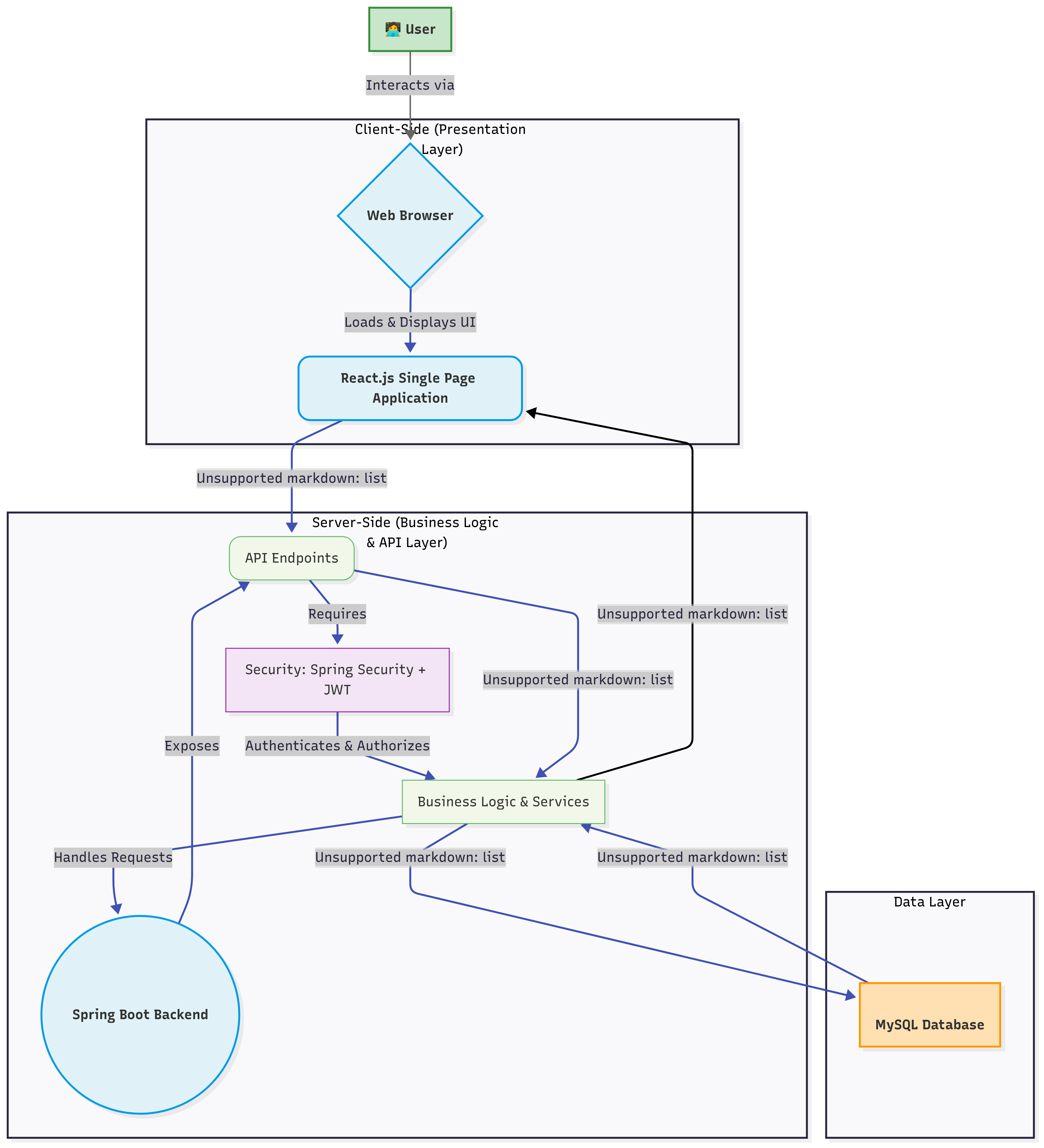
Classic 3-tier layered architecture, with Redis sitting alongside MySQL as a second, purpose-built data store for short-lived state, and an outbound integration layer for the third-party Groq LLM API:
Controller (REST API)  →  Service (Business Logic)  →  Repository (JPA / MySQL)
                                    │
                                    ├──▶  RedisTemplate  →  Redis  (OTPs, JWT blacklist)
                                    │
                                    └──▶  RestTemplate   →  Groq LLM API  (Chatbot replies)
The entire stack — application, MySQL, and Redis — runs containerized via Docker Compose on a shared internal network (see 🐳 Containerization below).
The codebase is organized by domain modules (feature-based packaging), not by layer — keeping related code co-located and the project scalable.
com.ankit.HealthCare_Backend/
├── appointment/          # Appointment booking, status updates, paginated repository queries
├── authentication/       # JWT + Redis blacklist, Redis-backed OTP, OAuth2, Security config
├── billing/              # Billing records, payment, revenue stats, Razorpay integration, paginated billing list
├── chatBot/              # AI Health Assistant — controller, service, DTOs; Groq LLM integration
├── communication/        # Contact Us feature
├── core/                 # Shared enums (AppointmentStatus, BillingStatus), Role entity, RedisConfig
├── Exception/            # GlobalExceptionHandler + custom exceptions (incl. ChatbotServiceException)
├── filemanagement/       # Profile picture upload/retrieval, Cloudinary integration
├── Notification/         # Notification entity & repository
├── prescription/         # Doctor prescriptions, paginated patient-facing query
└── usermanagement/       # Admin, Doctor, Patient, User, Profile sub-modules — paginated list endpoints in Admin/Doctor/Patient controllers





| Component | Technology | Version |
|---|---|---|
| Framework | Spring Boot | 3.5.7 |
| Security | Spring Security + JWT (jjwt) | 6.5.7 / 0.11.5 |
| In-Memory Store | Redis + Spring Data Redis (Lettuce client) | 3.5.7 |
| Social Login | Spring OAuth2 Client (Google) | 6.5.7 |
| Payment Gateway | Razorpay Java SDK | Latest stable |
| Media Storage | Cloudinary Java SDK | Latest stable |
| AI Chatbot | Groq LLM API (via RestTemplate) |
Latest stable |
| Containerization | Docker + Docker Compose | Multi-stage build |
| Spring Boot Starter Mail (JavaMailSender) | 3.5.7 | |
| ORM | Spring Data JPA + Hibernate | 3.5.7 |
| Pagination | Spring Data Pageable / Page<T> |
3.5.7 |
| Database | MySQL (mysql-connector-j) | 8.3.0 |
| Validation | Spring Boot Starter Validation (Jakarta) | 3.5.7 |
| API Docs | SpringDoc OpenAPI (Swagger UI) | 2.5.0 |
| Build | Maven | 3.x |
| Utilities | Lombok | 1.18.32 |
| Language | Java | 17 |
Request → JwtFilter → Redis blacklist check → Validate signature/expiry → Set SecurityContext → @PreAuthorize / hasRole()
- Registration —
POST /api/auth/registerwith full Bean Validation (@Valid) - Login —
POST /api/auth/loginreturns a signed JWT; doctors blocked until approved - Google OAuth2 —
/oauth2/**flow handled byOAuth2LoginSuccessHandler, redirects with token - JWT Filter —
JwtFilterintercepts every request, checks the Redis blacklist first, then validates signature & expiry - Logout / Revocation —
POST /api/auth/logoutblacklists the presented token in Redis for its remaining lifetime (see 🧠 Redis Integration below) - Role Guards —
/api/patient/**→ROLE_PATIENT,/api/doctor/**→ROLE_DOCTOR,/api/admin/**→ROLE_ADMIN,/api/profile/**→ROLE_PATIENTorROLE_DOCTORviahasAnyRole(the chatbot at/api/patient/chatbot/**inherits theROLE_PATIENTguard since it lives under/api/patient/**) - Email OTP —
POST /api/auth/send-otpsends a 6-digit OTP stored in Redis;POST /api/auth/verify-otpvalidates it before allowing registration - Password Reset — Secure time-limited token flow via
POST /api/auth/forgot-password→POST /api/auth/reset-password - BCrypt — All passwords hashed with
BCryptPasswordEncoder - Payment Signature Verification — Every Razorpay payment is verified server-side via HMAC signature before billing status changes — the client can never self-report a payment as successful
- Credential-Safe CORS —
CorsConfigurationSourceusesallowedOriginPatterns(never a bare"*") so credentialed requests (JWT-bearing) from the frontend are honored without violating the CORS spec
Redis was introduced to solve two problems a relational database handles poorly: data that must expire on its own, and a fast existence check that has to run on every single authenticated request. Both OTPs and the JWT blacklist fit that profile, so both moved off MySQL and onto Redis.
| Problem (before) | Why MySQL was a poor fit | Redis fix |
|---|---|---|
OTPs stored in an email_otps table with an expiryTime column, checked manually on every verify call |
Expiry had to be enforced in application code (expiryTime.isAfter(now)); expired/unverified rows never got cleaned up without a separate scheduled job |
Redis SETEX gives the key a TTL natively — it's simply gone when it expires, no cleanup job needed |
| Stateless JWTs have no logout — the only way to "log out" was to delete the token client-side, while the token itself stayed valid on the server until it naturally expired | JWTs are stateless by design; adding revocation state to MySQL would mean an extra table hit checked on every protected request | A blacklisted token's ID is stored as a Redis key with a TTL equal to its remaining lifetime — an O(1) in-memory lookup on every request, self-cleaning by design |
1. Configuration — core/config/RedisConfig.java defines a single RedisTemplate<String, String> bean (StringRedisSerializer for both key and value, since every value stored is a simple string — an OTP, a "true" flag, or a token marker — not a serialized object).
2. Redis-backed OTP store — authentication/service/EmailOtpService.java
redisTemplate.opsForValue().set(otpKey(email), otp, Duration.ofMinutes(otpExpiryMinutes));
redisTemplate.delete(verifiedKey(email));- Key pattern:
otp:<email>for the OTP itself,otp:verified:<email>for the post-verification flag - Sending a new OTP clears any stale
verifiedflag from a prior attempt, so a resend always requires verifying the new code — the account can't be created off the back of an old, already-consumed verification verifyOtp()deletes the OTP key on successful match (one-time use) and sets theverifiedflag with a slightly longer TTL than the OTP itself, giving the user a window to finish the registration form after verifying without needing to re-verify
3. Redis-backed JWT blacklist / logout — authentication/security/JwtService.java
public void blacklistToken(String token) {
    long remainingMs = getExpirationFromToken(token).getTime() - System.currentTimeMillis();
    if (remainingMs > 0) {
        redisTemplate.opsForValue().set("blacklist:" + token, "true", Duration.ofMillis(remainingMs));
    }
}

public boolean isTokenBlacklisted(String token) {
    return Boolean.TRUE.equals(redisTemplate.hasKey("blacklist:" + token));
}
POST /api/auth/logoutcallsblacklistToken(), keyed by the token itself, with a TTL set to exactly the token's remaining lifetime — once it would have expired naturally anyway, Redis discards the key on its own, so the blacklist never accumulates stale entriesJwtFilterchecksisTokenBlacklisted()before signature/expiry validation on every request — a logged-out token is rejected immediately with401, even if it hasn't reached its original expiry time
- Logout is now a real, server-enforced action, not just a client-side
localStorageclear — a captured or leaked token stops working the moment the legitimate user logs out - OTP expiry and cleanup are handled entirely by Redis's own TTL mechanism — zero custom expiry-checking or scheduled-cleanup code left in the OTP service
- Both features run as simple key/value operations (
SET,GET,DEL,EXISTSwith TTL) — no Redis data structures beyond strings were needed for either use case
| Feature | Redis Key Pattern | TTL | Backing Class |
|---|---|---|---|
| OTP verification | otp:<email> |
app.otp.expiry-minutes (default 10) |
EmailOtpService |
| Post-verify flag | otp:verified:<email> |
OTP expiry + 15 minutes | EmailOtpService |
| JWT logout/blacklist | blacklist:<jwt> |
Exactly the token's remaining lifetime | JwtService / checked in JwtFilter |
Profile pictures for both Patients and Doctors are uploaded directly to Cloudinary rather than local disk — meaning the API remains stateless and horizontally scalable (no shared filesystem needed across instances), and images are served from Cloudinary's CDN.
| Capability | Status |
|---|---|
Multipart image upload (multipart/form-data) |
✅ Implemented |
Content-type validation — only image/* accepted |
✅ Implemented |
| File size validation — 5MB max, rejected before upload | ✅ Implemented |
| Direct stream-to-Cloudinary upload (no local temp storage) | ✅ Implemented |
Role-aware persistence — updates Patient or Doctor entity based on logged-in user's role |
✅ Implemented |
| Returns CDN-backed image URL in response for immediate frontend use | ✅ Implemented |
1. Client sends multipart request  ──▶  POST /api/profile/upload-image  (field: profilePicture)
2. JwtFilter authenticates          ──▶  Principal resolved to logged-in user
3. ProfileService validates file    ──▶  content-type check + 5MB size check
4. CloudinaryService.uploadImage()  ──▶  streams file directly to Cloudinary, returns secure URL
5. Service resolves role            ──▶  PATIENT → Patient entity, DOCTOR → Doctor entity
6. profilePicture column updated    ──▶  persisted via @Transactional save
7. Response                         ──▶  { success, message, imageUrl }
Because the upload is wrapped in @Transactional, a failure at any stage (invalid file, Cloudinary error, DB save error) rolls back cleanly rather than leaving a partially-updated profile.
A patient-facing conversational assistant, backed by an LLM served through Groq's API, integrated behind the same JWT-secured, role-scoped API surface as the rest of the platform — not a bolt-on widget calling a third-party service directly from the frontend.
| Capability | Status |
|---|---|
Secured endpoint under ROLE_PATIENT (/api/patient/chatbot/ask) |
✅ Implemented |
Request validation (@Valid on ChatRequestDTO) — rejects empty/oversized messages |
✅ Implemented |
| Hard-coded system prompt constraining scope — general info + platform guidance only | ✅ Implemented |
| Explicit guardrail against diagnosis, prescriptions, or dosage recommendations | ✅ Implemented |
| Symptom-description handling redirected toward booking a real doctor on the platform | ✅ Implemented |
Server-side call to Groq's chat completion API via RestTemplate |
✅ Implemented |
Custom ChatbotServiceException → mapped to 503 Service Unavailable |
✅ Implemented |
Concise, bounded replies (temperature 0.5, max_tokens 400, 3–5 sentence prompt) |
✅ Implemented |
Swagger-documented with explicit response codes (200 / 400 / 503) |
✅ Implemented |
A health chatbot sitting inside a real appointment/records platform carries real risk if it's allowed to freelance as a diagnostic tool. The design deliberately keeps the LLM on a short leash:
1. Patient sends a message      ──▶  POST /api/patient/chatbot/ask   (JWT: ROLE_PATIENT)
2. @Valid on ChatRequestDTO     ──▶  rejects blank / too-long input before it ever reaches the LLM
3. ChatbotService builds request──▶  fixed SYSTEM_PROMPT + the patient's message, sent to Groq's chat API
4. Groq returns a completion    ──▶  parsed out of choices[0].message.content
5. Any transport/provider error──▶  wrapped as ChatbotServiceException → 503, never a raw stack trace
The system prompt is the actual security boundary here, not a suggestion — it explicitly forbids diagnosis, medication/dosage recommendations, or replacing a doctor's advice, and instructs the model to redirect any symptom description toward booking a real appointment on the platform. This mirrors how the Razorpay integration treats the backend (not the client) as the trust boundary — here, the system prompt plus the global exception handler are what keep the feature within safe, non-clinical bounds, rather than trusting the LLM's own judgment unconstrained.
Provider failures (Groq API down, network error, malformed response) are caught explicitly rather than allowed to bubble up as a generic 500 — surfaced instead as a clear 503 Service Unavailable with a user-friendly retry message, consistent with the rest of the API's centralized exception-handling philosophy.
| Layer | Class | Responsibility |
|---|---|---|
| Controller | chatBot.controller.ChatbotController |
Validates request, delegates to service, documents contract via Swagger |
| Service | chatBot.service.ChatbotService |
Builds the Groq request (system prompt + user message), parses the reply, wraps failures |
| DTOs | ChatRequestDTO, chatResponse |
Request/response shape for the /ask endpoint |
| Exception | Exception.ChatbotServiceException |
Signals AI-provider failures distinctly from validation/auth errors, mapped to 503 |
Every list-returning endpoint that can grow unbounded — doctors, patients, appointments, prescriptions, and billing records — is backed by Spring Data Pageable instead of returning a full, unbounded List<T>. This keeps response payloads small and predictable regardless of how much data accumulates in production.
| Capability | Status |
|---|---|
page / size query params accepted on all major list endpoints |
✅ Implemented |
Responses shaped as Spring Data Page<T> (content, totalElements, totalPages, number, …) |
✅ Implemented |
Database-level pagination via repository.findAll(Pageable) / derived paginated query methods |
✅ Implemented |
| Role-scoped paginated queries (e.g. a patient's own appointments/prescriptions only) | ✅ Implemented |
Sensible defaults (page=0, size=10) when query params are omitted |
✅ Implemented |
| Panel | Endpoint | Paginated Query |
|---|---|---|
| Admin | GET /api/admin/doctors |
DoctorRepository.findAll(Pageable) |
| Admin | GET /api/admin/patients |
PatientRepository.findAll(Pageable) |
| Admin | GET /api/admin/billing |
BillingRepository.findAllWithDetails(Pageable) |
| Doctor | GET /api/doctor/appointments/my |
AppointmentRepository.findByDoctorId(Long, Pageable) |
| Doctor | GET /api/doctor/patients |
Paginated derivation from the doctor's own appointment records |
| Patient | GET /api/patient/doctors |
DoctorRepository.findByIsApproved(boolean, Pageable) |
| Patient | GET /api/patient/appointments/my |
AppointmentRepository.findByPatientId(Long, Pageable) |
| Patient | GET /api/patient/prescriptions |
PrescriptionRepository.findByAppointment_Patient_Id(Long, Pageable) |
{
  "content": [ { "id": 1, "firstName": "Ankit", "lastName": "Kumar Gurjar", "...": "..." } ],
  "totalElements": 42,
  "totalPages": 5,
  "number": 0,
  "size": 10,
  "first": true,
  "last": false,
  "numberOfElements": 10,
  "empty": false
}
Pagination is handled entirely at the query level (Pageable pushed down into the repository), not by fetching a full table and slicing it in memory — so performance stays consistent as row counts grow.
The billing module integrates Razorpay end-to-end for appointment payments — not a mocked checkout, but a real gateway integration with proper order lifecycle and server-side trust boundaries.
| Capability | Status |
|---|---|
Order creation via backend (POST /api/patient/payments/create-order) |
✅ Implemented |
| Razorpay Checkout (UPI, Cards, Netbanking) | ✅ Implemented |
| Server-side payment signature verification (HMAC-SHA256) | ✅ Implemented |
Real-time billing status sync (UNPAID → PAID) |
✅ Implemented |
| Payment failure & checkout-dismissal handling | ✅ Implemented |
| Revenue reporting (daily / monthly) | ✅ Implemented |
A naive integration trusts the frontend to say "payment succeeded." This one doesn't. The flow is:
1. Frontend requests an order  ──▶  Backend calls Razorpay Orders API, returns order_id
2. Razorpay Checkout opens     ──▶  User pays via UPI / Card / Netbanking
3. Razorpay returns            ──▶  payment_id, order_id, signature  (to frontend)
4. Frontend forwards these     ──▶  Backend verification endpoint
5. Backend recomputes HMAC     ──▶  using Razorpay key secret
6. Only on signature match     ──▶  Billing status flips to PAID
This is the same trust model used by real fintech and healthtech platforms — the backend is the single source of truth for what counts as a successful payment, never the client.
Razorpay's Test Mode sandbox reproduces the entire checkout, OTP, and verification flow with zero real money movement — used to validate this integration end-to-end.
Card Payment
| Field | Test Value |
|---|---|
| Card Number | 4111 1111 1111 1111 (Visa) or 5267 3181 8797 5449 (Mastercard) |
| Expiry (MM/YY) | Any future date — e.g. 12/30 |
| CVV | Any 3 digits — e.g. 123 |
| Cardholder Name | Any name |
| OTP | Any 4–10 digit number — e.g. 1234 |
Select Success on Razorpay's mock bank page to complete the simulated transaction, or use card 4000 0000 0000 0002 and select Failure to test the failure path.
UPI Payment
| Field | Test Value |
|---|---|
| UPI ID | success@razorpay |
No need to scan the on-screen QR with a real device — that only resolves against live, NPCI-registered transactions. Entering the test UPI ID simulates an instant successful payment in sandbox mode.
Going live requires only swapping the test key (rzp_test_...) for a live key (rzp_live_...) post KYC/activation on Razorpay's dashboard — no changes to the integration logic itself.
A single @RestControllerAdvice class handles all error scenarios and returns a consistent JSON error envelope:
{
  "timestamp": "2025-10-27T14:32:10.123",
  "status": 404,
  "message": "Doctor with id 5 not found"
}| Exception | HTTP Status |
|---|---|
ResourceNotFoundException |
404 Not Found |
DuplicateResourceException |
409 Conflict |
UnauthorizedException |
401 Unauthorized |
IllegalArgumentException |
400 Bad Request |
MethodArgumentNotValidException |
400 Bad Request (validation errors) |
PaymentVerificationException |
400 Bad Request (Razorpay signature mismatch) |
ChatbotServiceException |
503 Service Unavailable (Groq API unreachable or unparsable response) |
Exception (fallback) |
500 Internal Server Error |
All incoming request DTOs are validated with Jakarta Bean Validation annotations before reaching the service layer:
// RegisterRequestDTO example
@NotNull @NotBlank @Email        private String email;
@NotNull @NotBlank               private String password;
@Digits(integer=10, fraction=0)  private Long contactNumber;

// AppointmentDTO example
@NotNull  private Long patientId;
@NotNull  private Long doctorId;
@NotNull  private LocalDate appointmentDate;

// PaymentVerificationDTO example
@NotNull @NotBlank  private String razorpayOrderId;
@NotNull @NotBlank  private String razorpayPaymentId;
@NotNull @NotBlank  private String razorpaySignature;
@NotNull             private Long appointmentId;

// ChatRequestDTO example
@NotBlank @Size(max = 1000)  private String message;
Validation failures are caught by the Global Exception Handler and returned as structured 400 Bad Request responses.
📄 Endpoints marked (Paginated) accept optional
page(default0) andsize(default10) query params and return a Spring DataPage<T>— see 📄 Server-Side Pagination above for the response shape.
| Method | Endpoint | Description | Auth |
|---|---|---|---|
| POST | /send-otp |
Send 6-digit OTP to email, stored in Redis | Public |
| POST | /verify-otp |
Verify the Redis-stored OTP before registration | Public |
| POST | /register |
Register a new user (Patient/Doctor) | Public |
| POST | /login |
Authenticate and receive JWT | Public |
| POST | /logout |
Blacklist the current JWT in Redis, invalidating it immediately | Authenticated |
| POST | /forgot-password |
Request a password reset token | Public |
| POST | /reset-password |
Reset password using token | Public |
| GET | /oauth2/callback |
Google OAuth2 redirect handler | Public |
| Method | Endpoint | Description |
|---|---|---|
| GET | /doctors |
Browse all approved doctors (Paginated) |
| POST | /appointments/new |
Book a new appointment |
| GET | /appointments/my |
View personal appointment history (Paginated) |
| DELETE | /appointments/{id}/cancel |
Cancel an appointment |
| PUT | /appointments/{id}/pay |
Make payment for an appointment |
| POST | /payments/create-order |
Create a Razorpay order for an appointment |
| POST | /payments/verify |
Verify Razorpay payment signature and mark billing as PAID |
| GET | /prescriptions |
View personal prescriptions (Paginated) |
| GET | /profile |
View own patient profile (includes profilePicture URL) |
| POST | /chatbot/ask |
Ask the AI Health Assistant a question; returns a general-info reply (never diagnosis/prescriptions) |
| Method | Endpoint | Description |
|---|---|---|
| GET | /profile |
View own doctor profile (includes profilePicture URL) |
| GET | /appointments/my |
View all own appointments (Paginated) |
| PUT | /appointments/{id}/status |
Update appointment status (triggers in-app + email notifications) |
| GET | /patients |
View all own patients (Paginated) |
| POST | /prescription |
Create a prescription |
| GET | /prescriptions |
View all own prescriptions |
| Method | Endpoint | Description |
|---|---|---|
| POST | /upload-image |
Upload a profile picture (multipart/form-data, field: profilePicture) — validated, streamed to Cloudinary, and linked to the caller's Patient or Doctor record |
| DELETE | /delete-image |
Remove the current profile picture |
| Method | Endpoint | Description |
|---|---|---|
| GET | /doctors |
Get all doctors (including pending) (Paginated) |
| PUT | /doctors/{id}/approve |
Approve a doctor |
| PUT | /doctors/{id}/reject |
Reject / revoke a doctor |
| GET | /patients |
Get all patients (Paginated) |
| GET | /billing |
View all billing records (Paginated) |
| PUT | /billing/{id}/status |
Update a billing record's status |
| GET | /revenue/daily |
Get today's total revenue |
| GET | /revenue/monthly |
Get current month's total revenue |
| Method | Endpoint | Description |
|---|---|---|
| GET | /my |
Get all notifications for logged-in user (newest first) |
| GET | /unread-count |
Get count of unread notifications (for UI badge) |
| PUT | /{id}/read |
Mark a specific notification as read |
| PUT | /mark-all-read |
Mark all unread notifications as read |

Core entities: User, Role, Patient, Doctor, Admin, Appointment, Prescription, Billing, ContactUs, Notification, PasswordResetToken
Billing stores the Razorpay orderId, paymentId, and status (UNPAID / PAID) per appointment, giving a full payment audit trail per record.
Patient and Doctor each store a profilePicture column holding the Cloudinary-hosted CDN URL of the user's uploaded profile image.
Note: OTPs and the JWT blacklist are intentionally not part of this relational schema — they live in Redis as short-lived keys, not MySQL rows, since neither needs to survive past its own expiry. The AI chatbot is similarly stateless from a persistence standpoint — conversations are not stored server-side; each
/askcall is a single, independent request to the LLM.
Once running, the interactive Swagger UI is available at:
http://localhost:8080/swagger-ui/index.html
Paginated endpoints are documented with their page/size query parameters directly in Swagger's interactive "Try it out" panel. The chatbot endpoint is documented with its explicit 200 / 400 / 503 response codes.
The entire backend stack — application, MySQL, and Redis — runs fully containerized via a multi-stage Docker build and Docker Compose orchestration, verified end-to-end (not just "should work").
| Capability | Status |
|---|---|
Multi-stage Dockerfile (Maven build stage → lightweight JRE runtime) |
✅ Implemented |
docker-compose.yml orchestrating backend + MySQL + Redis together |
✅ Implemented |
| Health-checked startup ordering — backend waits for both MySQL and Redis to report healthy, not just "container started" | ✅ Implemented |
.env-driven configuration via env_file, no hardcoded secrets |
✅ Implemented |
Docker-internal service networking (mysql-db, redis-cache resolved by name, no localhost) |
✅ Implemented |
| Persistent volumes for both MySQL and Redis data | ✅ Implemented |
FROM maven:3.9.6-eclipse-temurin-17 AS build   # Stage 1: full JDK + Maven + source
...
FROM eclipse-temurin:17-jre-alpine             # Stage 2: JRE + built jar only
COPY --from=build /app/target/*.jar app.jar
The build stage needs the full Maven toolchain and source tree to produce the jar; the runtime stage needs neither. Shipping only the compiled jar into a minimal Alpine JRE image keeps the deployed container free of build tools, source code, and dependency caches.
Early in wiring this up, depends_on: condition: service_healthy alone wasn't enough — on a first-time run with a fresh volume, MySQL's own initialization (creating system tables, InnoDB setup) took longer than the healthcheck's default grace period, so Docker marked it unhealthy and refused to start the backend, even though MySQL was still legitimately mid-startup:
Container hospital_db  Error
dependency mysql-db failed to start
dependency failed to start: container hospital_db is unhealthy
The fix was widening the healthcheck's patience specifically for the slow, one-time first-init path:
healthcheck:
  test: ["CMD", "mysqladmin", "ping", "-h", "localhost"]
  interval: 10s
  timeout: 5s
  retries: 10
  start_period: 90s
This is the same category of race condition that can silently break a production deploy on a cold volume — worth catching in local Docker testing rather than in a live rollout.
docker-compose up --buildThis builds the backend image and brings up MySQL and Redis alongside it on a shared Docker network — no local MySQL or Redis install required. Confirmed working: Swagger UI (http://localhost:8080/swagger-ui/index.html), Hibernate DDL auto-creating all tables/constraints, and JWT/OAuth2 security filter chain, all through the containerized stack.
- Java 17+
- Maven 3.x
- MySQL 8.x
- Redis 7.x (local install, or a managed free tier such as Upstash/Redis Cloud)
- A Razorpay account (Test Mode keys are free — no business verification needed to start testing)
- A Cloudinary account (free tier is sufficient for development)
- A Groq API key (free tier available — required for the AI Health Assistant chatbot)
- Docker & Docker Compose (optional, but recommended — see 🐳 Containerization above for a zero-local-install setup)
git clone https://github.com/ankitdoi-coder/healthcare-backend.git
cd healthcare-backend
Create the database:
CREATE DATABASE healthcaredb;Confirm Redis is reachable:
redis-cli ping
# should return: PONG
Configure src/main/resources/application.properties:
spring.datasource.url=${DB_URL}
spring.datasource.username=${DB_USERNAME}
spring.datasource.password=${DB_PASSWORD}
spring.data.redis.host=${REDIS_HOST:localhost}
spring.data.redis.port=${REDIS_PORT:6379}
spring.data.redis.password=${REDIS_PASSWORD:}
app.jwt.secret=${JWT_SECRET}
app.jwt.expiration=${JWT_EXPIRATION_MS}
razorpay.key.id=${RAZORPAY_KEY_ID}
razorpay.key.secret=${RAZORPAY_KEY_SECRET}
cloudinary.cloud-name=${CLOUDINARY_CLOUD_NAME}
cloudinary.api-key=${CLOUDINARY_API_KEY}
cloudinary.api-secret=${CLOUDINARY_API_SECRET}
groq.api.key=${GROQ_API_KEY}
groq.api.url=${GROQ_API_URL}
groq.model=${GROQ_MODEL}
Run:
mvn spring-boot:runServer starts at http://localhost:8080
git clone https://github.com/ankitdoi-coder/healthcare-backend.git
cd healthcare-backend
# create a .env file with the variables listed below
docker-compose up --build
No local MySQL, Redis, or Maven install required — see 🐳 Containerization above for details on the multi-stage build and service orchestration.
| Variable | Description | Example |
|---|---|---|
DB_URL |
JDBC connection URL | jdbc:mysql://localhost:3306/healthcaredb |
DB_USERNAME |
Database username | root |
DB_PASSWORD |
Database password | your_password |
REDIS_HOST |
Redis host | localhost |
REDIS_PORT |
Redis port | 6379 |
REDIS_PASSWORD |
Redis password (blank for local dev) | (empty) |
JWT_SECRET |
Secret key for signing JWTs | a-very-long-random-secret-key |
JWT_EXPIRATION_MS |
Token TTL in milliseconds | 86400000 (24h) |
RAZORPAY_KEY_ID |
Razorpay API Key ID (test or live) | rzp_test_xxxxxxxxxxxx |
RAZORPAY_KEY_SECRET |
Razorpay API Key Secret (test or live) | your_razorpay_key_secret |
CLOUDINARY_CLOUD_NAME |
Cloudinary account cloud name | your_cloud_name |
CLOUDINARY_API_KEY |
Cloudinary API key | 123456789012345 |
CLOUDINARY_API_SECRET |
Cloudinary API secret | your_cloudinary_secret |
GROQ_API_KEY |
Groq API key for the AI chatbot | gsk_xxxxxxxxxxxxxxxxxxxx |
GROQ_API_URL |
Groq chat completions endpoint | https://api.groq.com/openai/v1/chat/completions |
GROQ_MODEL |
Groq model identifier to use | llama-3.1-8b-instant |
When running via Docker Compose, these are supplied through a
.envfile referenced byenv_fileindocker-compose.yml— no secrets are hardcoded into the image or the compose file itself.
The system sends dual-channel notifications (in-app + email) for all key appointment events. Notifications include appointment time and reason details for full context.
When a patient books an appointment:
In-App Notification (stored in database)
- Sent to: Patient & Doctor
- Message: "Your Appointment Booked with Doctor: [Name]" (Patient) / "You have new Appointment from Patient: [Name]" (Doctor)
- Type:
APPOINTMENT - Read/Unread tracking enabled
Email Notification (via JavaMailSender)
- Patient receives: Appointment confirmation with doctor name, date, and gratitude message
- Doctor receives: Appointment alert with patient name, scheduled date, and dashboard reminder
- Both emails include appointment time (
LocalTime) and reason for visit details
When a doctor updates the appointment status (SCHEDULED → COMPLETED / CANCELED, etc.):
In-App Notification (to patient)
- Message: "Your appointment status has been updated to: [STATUS] by Dr. [Name]"
- Type:
APPOINTMENT
Email Notification (to patient)
- Subject: "Appointment Status Update"
- Contains: Appointment date, doctor name, new status, and dashboard link
Patients and doctors can:
- Retrieve all notifications sorted by creation date (newest first)
- Check unread notification count (for UI bell badge)
- Mark individual notifications as read
- Mark all notifications as read in one call
APPOINTMENT— Appointment booking and status changesPRESCRIPTION— Prescription-related (extensible for future use)PAYMENT— Payment status updates (extensible for future use)REGISTRATION— Account registration events (extensible for future use)
This project was built to demonstrate practical, production-grade backend engineering rather than tutorial-level CRUD:
- 🧠 Redis used for the right reasons, not for its own sake — introduced specifically for self-expiring data (OTPs) and a revocation check that has to run on every request (JWT blacklist), rather than caching data that didn't need it.
- 🔐 Security-first payment handling — billing status is never trusted from the client; it's gated behind server-side HMAC signature verification, mirroring real fintech/healthtech systems.
- 🚪 Real logout for stateless JWTs — a token can be revoked before its natural expiry, closing the gap that pure client-side logout leaves open.
- ☁️ Stateless media handling — profile pictures stream directly to Cloudinary rather than local disk, keeping the API instance-agnostic and production-portable from day one.
- 📄 Query-level pagination, not in-memory slicing — every list endpoint that can grow unbounded pushes
Pageabledown into the repository layer, so response times stay flat as data volume grows instead of degrading with a full-table fetch. - 🤖 Guardrailed LLM integration, not an open-ended chatbot — the AI assistant's system prompt is treated as an actual safety boundary (no diagnosis, no dosages, redirect symptoms to real doctors), and provider failures are caught explicitly rather than leaking a raw exception to the client.
- 🐳 Real containerization, not a token Dockerfile — a multi-stage build, health-checked service dependencies, persistent volumes, and a first-init race condition actually caught and fixed during local testing rather than glossed over.
- 🪪 Stateless, role-scoped JWT auth with a proper OAuth2 social login path alongside it.
- 🧩 Consistent error contracts across the entire API via a single global exception handler.
- 🏗️ Domain-driven package structure that scales cleanly as features are added, rather than a flat MVC layout.
- 🔗 Real third-party integration experience with Razorpay's order lifecycle (create → checkout → verify), Cloudinary's upload API, and Groq's LLM API — not simulated or mocked integrations.
- 🎥 Documented engineering process — video walkthroughs above show real debugging and design decisions, not just polished final output.
