Modular Multi-Tool for Windows
By Xorcode



XorTool is a modular multi-tool for Windows, written in Python. It provides several network utilities and handy tools through a stylish terminal menu.
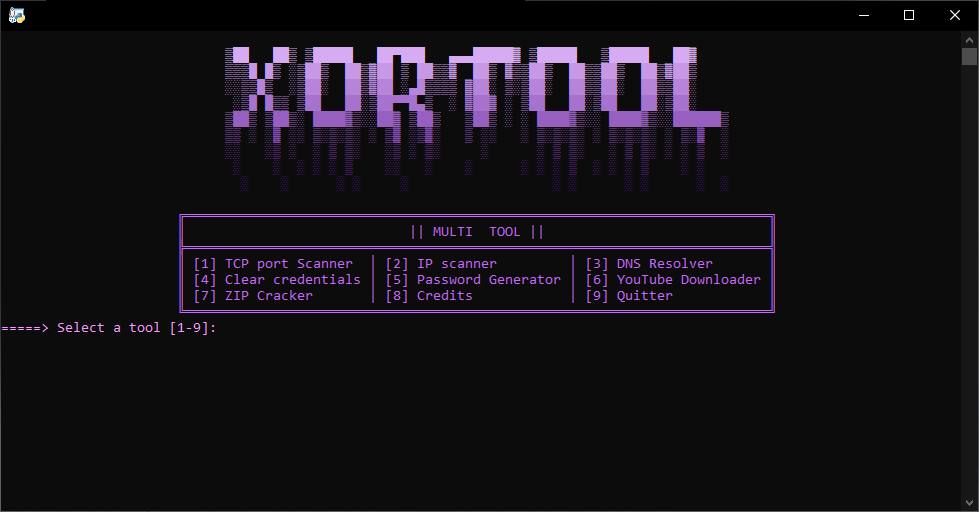
-
[1] TCP Port Scanner
Scan open TCP ports on a target. -
[2] IP Scanner
Scan an IP range to find active hosts. -
[3] DNS Resolver
Resolve domain names to IP addresses. -
[4] Clear Credentials
Erase stored xbox/xblticktes credentials. -
[5] Password Generator
Generate strong, random passwords. -
[6] YouTube Downloader
Download YouTube videos using yt-dlp (requires ffmpeg). -
[7] ZIP Cracker
Brute-force ZIP files protected by passwords (using zip-cracker). -
[8] Credits
Display credits and used dependencies. -
[9] Quit
Exit the program.
- Download or clone the repository and open the project folder.
- Install Python 3.x (make sure Python is added to PATH).
- Install the required Python dependencies (
yt-dlp,requests, or viarequirements.txtif available). - Ensure all custom modules are inside the
modules/folder at the project root. - Download and install FFmpeg (add the
binfolder to your Windows Environment Variables). - Restart your terminal or PC, and check FFmpeg installation by running
ffmpeg -version.
- Run the main script using Command Prompt or PowerShell:
Start the program and follow the on-screen menu. - Select a tool by entering its corresponding number.
- ZIP Cracker : zip-cracker
- YouTube Downloader : yt-dlp (requires ffmpeg)
- Windows Only: This tool is designed specifically for Windows.
- For educational and personal use only.
- Do not use any network tools or downloaders without permission on external machines.