| Resource | Link |
|---|---|
| 🌐 Live App | https://supamail-five.vercel.app |
| 🎥 Demo Video | https://youtu.be/-05sa0db37c |
| 🧵 YC style video | https://x.com/shivamdotdev/status/2067662274685526313 |
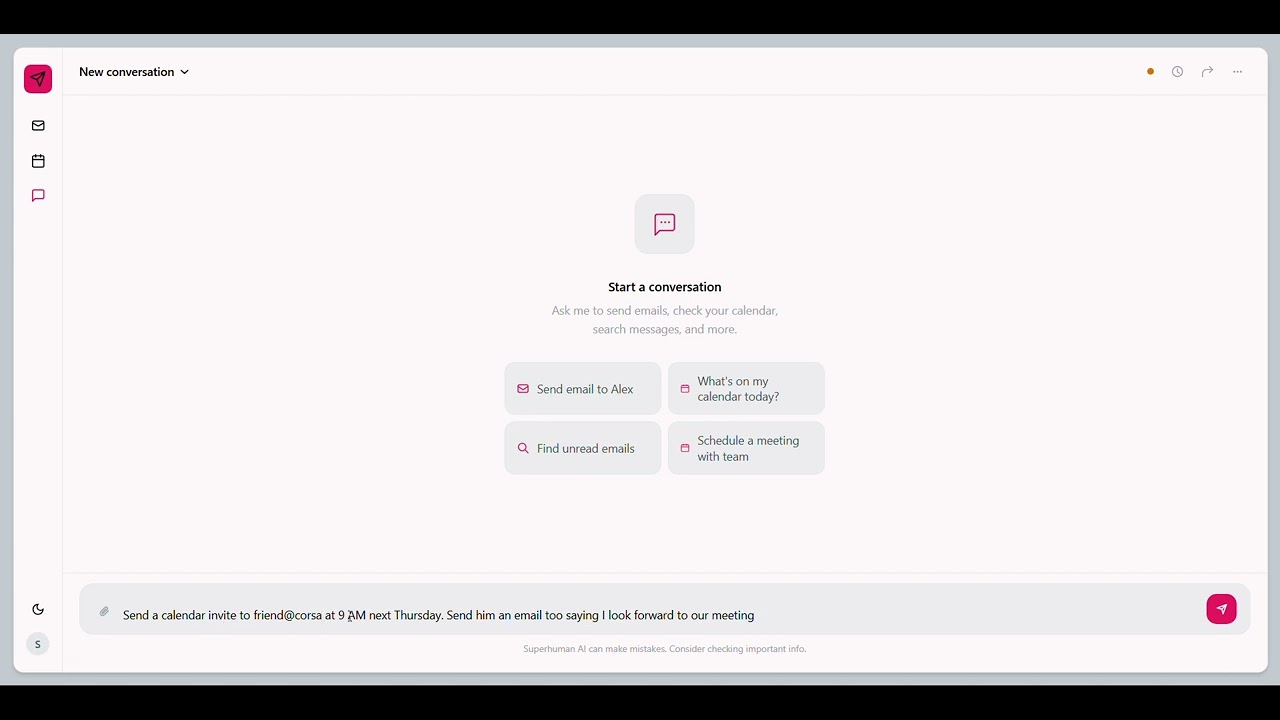
A full-stack Next.js 16 application that brings Superhuman-style productivity to Gmail and Google Calendar. It combines real-time email sync, AI-powered prioritisation, semantic search, and an agentic chat interface into a single, self-hosted product.
Managing Gmail and Google Calendar often requires switching between multiple screens, manually searching through emails, and repeating common actions.
Super is an AI-powered productivity layer built on top of Gmail and Google Calendar using Corsair.
Instead of manually searching emails, prioritizing messages, creating calendar events, and navigating multiple interfaces, users can:
- Search emails using natural language
- Automatically identify important messages
- Manage calendar events from one place
- Use an AI assistant to perform actions on their behalf
- Receive real-time updates instantly
Super transforms Gmail and Calendar from a collection of tools into a unified AI workspace.
- Features
- Build Journey in Public
- Architecture Overview
- Tech Stack
- Project Structure
- Database Schema
- LLM Provider System
- Queue & Background Jobs
- Webhook System
- Authentication & OAuth
- Corsair Integration Layer
- API Routes
- Environment Variables
- Local Development Setup
- Production Deployment
- Webhook Setup (Google Pub/Sub)
- Gmail Integration — read, archive, send, compose drafts, real-time push notifications via Google Pub/Sub
- Google Calendar — list, create, update, RSVP to events; real-time push via webhook channels
- AI Chat Agent — intent-routing chat that decides whether to answer conversationally or dispatch an agent that executes Gmail/Calendar actions via MCP tools
- Email Prioritisation — background BullMQ worker scores emails as
urgent,high,normal, orlowusing an LLM; results pushed to client over SSE - Semantic Search — vector embeddings stored in pgvector; cosine-similarity search across email bodies
- Drafts — local + Gmail draft sync with auto-save
- Real-time SSE — per-user server-sent event streams for live inbox updates, priority scoring, and agent feedback
- Multi-LLM — swap chat and embedding models via env vars without touching code
- Rate Limiting — per-user API rate limiting via Upstash Redis
- Structured Logging — structured JSON logs throughout the server layer
I documented the development of Super publicly on X (Twitter), sharing progress updates, architecture decisions, feature launches, debugging sessions, and milestones throughout the build process.
| Date | Update |
|---|---|
| Aug 31, 2025 | Development Update #1 |
| Sep 07, 2025 | Development Update #2 |
| Sep 08, 2025 | Development Update #3 |
| Sep 09, 2025 | Development Update #4 |
| Sep 10, 2025 | Development Update #5 |
| Sep 10, 2025 | Development Update #6 |
| Sep 11, 2025 | Development Update #7 |
| Sep 12, 2025 | Development Update #8 |
| Sep 12, 2025 | Development Update #9 |
Browser (Next.js App Router)
        │
        ├─── App Routes (/inbox, /chat, /home)
        │         │
        │    React Query + SSE consumer
        │
        └─── API Routes (app/api/*)
                  │
          ┌───────┼──────────────────────────┐
          │       │                          │
     Auth (NextAuth)   Services           Webhooks
     JWT + Google     ┌────────────┐      /api/webhooks
     OAuth 2.0        │ email.svc  │        │
                      │ chat.svc   │    Google Pub/Sub (Gmail)
                      │ search.svc │    Google Push Channel (Calendar)
                      │ priority.svc│
                      │ calendar.svc│
                      └─────┬──────┘
                            │
              ┌─────────────┼─────────────────┐
              │             │                 │
           Corsair        Drizzle ORM      BullMQ Queue
       (OAuth token       PostgreSQL +      (Redis / IORedis)
        management)       pgvector             │
              │                          Priority Worker
         Gmail API                       (LLM email scoring
         Calendar API                     + embedding)
              │
        LLM Provider
     (Anthropic / OpenRouter
      / OpenAI / Gemini)
| Layer | Technology |
|---|---|
| Framework | Next.js 16 (App Router) |
| Language | TypeScript 5 |
| Auth | NextAuth v4 — Google OAuth 2.0, JWT sessions |
| Database | PostgreSQL + pgvector (via pg pool) |
| ORM | Drizzle ORM |
| Caching / Rate-limiting | Upstash Redis (REST) |
| Background Jobs | BullMQ + IORedis (production), p-queue (development) |
| Google API layer | Corsair (corsair, @corsair-dev/gmail, @corsair-dev/googlecalendar) |
| AI / LLM | Anthropic SDK, OpenRouter (OpenAI-compatible), Google GenAI, Vercel AI SDK |
| Real-time | Server-Sent Events (custom SSE lib) |
| Styling | Tailwind CSS 3.4 |
| Validation | Zod |
| State management | TanStack Query v5 |
super-main/
├── app/                        # Next.js App Router
│   ├── (app)/                  # Authenticated app shell
│   │   ├── inbox/              # Inbox list + email detail pages
│   │   ├── chat/               # AI chat interface
│   │   └── layout.tsx
│   ├── (auth)/login/           # Login page
│   ├── api/                    # API route handlers
│   │   ├── auth/               # NextAuth + custom OAuth callback
│   │   ├── emails/             # Email CRUD + archive
│   │   ├── drafts/             # Draft CRUD
│   │   ├── search/             # Semantic + Gmail query search
│   │   ├── chat/               # AI agent chat endpoint
│   │   ├── calendar/events/    # Calendar CRUD + RSVP
│   │   ├── connect/            # Corsair account connection flow
│   │   ├── events/stream/      # SSE stream endpoint
│   │   ├── webhooks/           # Google push notification handler
│   │   └── health/             # Health check
│   └── globals.css
│
├── src/
│   ├── auth/
│   │   ├── config.ts           # NextAuth options, JWT/session callbacks
│   │   └── auth.service.ts     # getOrCreateUser helper
│   ├── env.ts                  # Validated env schema (t3-oss/env-nextjs + Zod)
│   ├── jobs/
│   │   ├── priority-queue.ts   # Dev (p-queue) / prod (BullMQ) abstraction
│   │   ├── priority-worker.ts  # BullMQ worker — LLM scoring + embedding
│   │   └── redis-bullmq.ts     # IORedis singleton for BullMQ
│   ├── lib/
│   │   ├── api-client.ts       # Browser-side fetch wrappers
│   │   ├── api-response.ts     # Standard API response helpers
│   │   ├── errors.ts           # Typed error constructors
│   │   ├── logger.ts           # Structured JSON logger
│   │   ├── redis.ts            # Upstash Redis singleton (rate-limiting)
│   │   └── tenant.ts           # Tenant ID utilities
│   ├── middleware/
│   │   ├── auth.ts             # withAuth() — verifies NextAuth session
│   │   ├── rate-limit.ts       # withRateLimit() — Upstash sliding window
│   │   └── request-id.ts       # Injects X-Request-ID header
│   ├── schema/                 # Zod request/response schemas
│   ├── server/
│   │   ├── db/
│   │   │   ├── index.ts        # Drizzle + pg Pool singleton
│   │   │   └── schema/         # All table definitions
│   │   │       ├── users.ts
│   │   │       ├── emails.ts   # emails + drafts tables
│   │   │       ├── events.ts   # calendar_events table
│   │   │       ├── agent-logs.ts
│   │   │       └── schema.ts   # Corsair integration tables
│   │   ├── lib/
│   │   │   ├── corsair.ts      # Corsair singleton + getTenant()
│   │   │   ├── llm-provider.ts # Multi-LLM registry: getChatClient(), getEmbedding()
│   │   │   ├── gmail-parser.ts # Raw Gmail API → clean email objects
│   │   │   ├── sse.ts          # SSE emitter / subscriber registry
│   │   │   └── webhook-subscriptions.ts  # Gmail watch() + Calendar push channels
│   │   ├── services/
│   │   │   ├── chat.service.ts    # Intent classification + agent routing
│   │   │   ├── email.service.ts   # Gmail sync, fetch, archive
│   │   │   ├── search.service.ts  # Semantic + keyword search
│   │   │   ├── priority.service.ts # LLM email scoring
│   │   │   └── calendar.service.ts # Calendar CRUD
│   │   └── webhooks/
│   │       └── index.ts        # handleGmailWebhook / handleCalendarWebhook
│   ├── components/
│   │   ├── Email/              # EmailDetail, body parser
│   │   ├── compose/            # Compose modal
│   │   └── search/             # Search command palette, Gmail query builder
│   └── types/                  # Shared TypeScript types
│
├── corsair.ts                  # Re-exports Corsair singleton
├── tailwind.config.ts
├── eslint.config.mjs
└── package.json
The app uses PostgreSQL with the pgvector extension. All tables are managed by Drizzle ORM.
Stores authenticated users. googleSub is the Google OAuth sub claim and doubles as the Corsair tenant key.
| Column | Type | Notes |
|---|---|---|
id |
uuid PK | Internal UUID |
email |
text UNIQUE | |
name |
text | |
image |
text | |
google_sub |
text UNIQUE | Google stable user ID |
gmail_history_id |
text | Cursor for Gmail history.list polling |
gmail_watch_expiration |
timestamptz | When the current Gmail watch() expires |
calendar_channel_id |
text | Google Calendar push channel ID |
calendar_resource_id |
text | |
calendar_watch_expiration |
timestamptz |
One row per Gmail message per user. Embeddings stored in a vector(N) column whose dimension matches ACTIVE_EMBEDDING_MODEL.
| Column | Type | Notes |
|---|---|---|
id |
uuid PK | |
user_id |
uuid FK → users | cascade delete |
gmail_id |
text | Gmail message ID |
thread_id |
text | |
from_addr / to_addrs / cc_addrs / bcc_addrs |
text / json[] | |
subject / snippet / body |
text | |
is_read |
boolean | |
labels |
json | Gmail label array |
priority |
text | urgent | high | normal | low |
attachments |
json | Array of EmailAttachment |
embedding |
vector(N) | pgvector — dimension set by ACTIVE_EMBEDDING_MODEL |
received_at |
timestamptz |
Unique constraint: (user_id, gmail_id).
| Column | Type | Notes |
|---|---|---|
id |
uuid PK | |
user_id |
uuid FK → users | |
gmail_draft_id |
text | Null until first save to Gmail |
to_addrs / cc_addrs |
json | |
subject / body |
text |
| Column | Type | Notes |
|---|---|---|
id |
uuid PK | |
user_id |
uuid FK → users | |
gcal_id |
text | Google Calendar event ID |
summary / description / location |
text | |
start_time / end_time |
text | ISO 8601 strings |
attendees |
json | Array of Attendee |
status |
text | confirmed | tentative | cancelled |
calendar_type |
text | Work | Personal | Meetings | Study | Deadlines |
Audit trail for every AI chat interaction.
| Column | Type | Notes |
|---|---|---|
id |
uuid PK | |
user_id |
uuid FK → users | |
prompt |
text | |
response |
text | |
actions |
json | Array of AgentAction |
duration_ms |
text |
corsair_integrations, corsair_accounts, corsair_entities, corsair_events — created and maintained by the Corsair library. Do not modify manually.
src/server/lib/llm-provider.ts is the single source of truth for all LLM calls. Nothing else in the codebase imports provider SDKs directly.
| Key | Provider | Model | Tool-calling |
|---|---|---|---|
claude-sonnet-4-6 (default) |
Anthropic | claude-sonnet-4-6 | ✅ |
nex-n2-pro |
OpenRouter | nex-agi/nex-n2-pro:free | ✅ |
nemotron-3-ultra |
OpenRouter | nvidia/nemotron-3-ultra-550b-a55b:free | ✅ |
nemotron-3-nano-omni |
OpenRouter | nvidia/nemotron-3-nano-omni-30b-a3b-reasoning:free | ❌ |
gpt-oss-120b |
OpenRouter | openai/gpt-oss-120b:free | ✅ |
Switch via LLM_CHAT_MODEL env var.
| Key | Provider | Model | Dimensions |
|---|---|---|---|
openai-3-small (default) |
OpenAI | text-embedding-3-small | 1536 |
nemotron-embed-vl |
OpenRouter | nvidia/llama-nemotron-embed-vl-1b-v2:free | 4096 |
gemini-embedding |
gemini-embedding-001 | 768 |
Switch via LLM_EMBEDDING_MODEL env var. Changing the embedding model requires re-migrating the DB because the vector(N) column dimension changes.
The chat service also supports multiple agent execution backends controlled by LLM_PROVIDER_FOR_AGENT:
| Value | Description |
|---|---|
anthropic |
Anthropic SDK with Corsair MCP tool binding |
openai_agents |
OpenAI Agents SDK |
nex |
OpenRouter free models via OpenAI-compatible API |
vercel_ai |
Vercel AI SDK streaming |
Email enrichment (LLM priority scoring + embedding generation) is handled asynchronously.
Uses p-queue — runs in-process, no Redis required. Jobs are processed immediately after being enqueued.
Uses BullMQ backed by IORedis (REDIS_URL). The worker (src/jobs/priority-worker.ts) must be started separately or via Next.js instrumentation.ts:
// instrumentation.ts (project root)
export async function register() {
  if (
    process.env.NEXT_RUNTIME === "nodejs" &&
    process.env.NODE_ENV === "production"
  ) {
    await import("./src/jobs/priority-worker");
  }
}
The queue is named email-enrichment. Each job carries { userId, googleSub, gmailId, subject, snippet, body }.
Gmail push notifications are delivered via a Google Cloud Pub/Sub push subscription to /api/webhooks. The endpoint:
- Decodes the base64 Pub/Sub payload to extract
emailAddress - Looks up the user by
google_subto derive the Corsair tenant ID - Delegates to
handleGmailWebhook()which callscorsair.processWebhook() - Emits an SSE event to the user's live stream
- Queues an email enrichment job
Calendar push notifications use Google's direct HTTP push to /api/webhooks?token=<WEBHOOK_SHARED_SECRET>. The token is validated on every request.
- All incoming Calendar webhooks are validated against
WEBHOOK_SHARED_SECRET - Gmail Pub/Sub messages are validated by Corsair's internal signature check
- Hard-delete operations (
messages.delete,threads.delete) are permanently blocked via Corsair permission overrides
- Provider: Google OAuth 2.0 via NextAuth v4 (
/api/auth/[...nextauth]) - Session strategy: JWT (stored in cookie)
- Scopes requested:
openid,email,profilegmail.modify,gmail.send,gmail.composecalendar
- Access type:
offlinewithprompt: consentto guarantee a refresh token on first auth - Token refresh: Handled transparently by Corsair on each API call using the stored refresh token. NextAuth flags expired tokens with
RefreshAccessTokenErrorbut does not block requests. - User provisioning:
getOrCreateUser()inauth.service.tsupserts ausersrow on first sign-in and storesgoogleSub.
Corsair is a multi-tenant OAuth credential manager. It:
- Stores encrypted OAuth tokens per user in the
corsair_*DB tables - Automatically refreshes expired access tokens
- Provides typed Gmail and Calendar API clients
- Exposes MCP (Model Context Protocol) tools for the AI agent
Tenant ID convention: Corsair requires string tenant IDs. Because Google sub values are all-numeric (which trips Corsair's Zod validation), tenant IDs are always prefixed: user_<googleSub>.
// src/server/lib/corsair.ts
export function getTenantId(userId: string): string {
  return `user_${userId}`;
}
export function getTenant(userId: string) {
  return corsair.withTenant(getTenantId(userId));
}
Permissions model (cautious mode):
- Reads and writes: allowed immediately
messages.deleteandthreads.delete: permanently denied (use archive/trash instead)events.delete: requires approval
Key Encryption Key (KEK): All stored OAuth tokens are encrypted at rest using CORSAIR_KEK. This must be a random string of at least 32 characters. Rotating it invalidates all stored credentials.
| Method | Path | Description |
|---|---|---|
| GET | /api/emails |
List emails for authenticated user |
| GET | /api/emails/[id] |
Get single email |
| POST | /api/emails/[id]/archive |
Archive email |
| GET | /api/drafts |
List drafts |
| POST | /api/drafts |
Create draft |
| PUT | /api/drafts/[id] |
Update draft |
| DELETE | /api/drafts/[id] |
Delete draft |
| GET | /api/search |
Semantic + Gmail query search |
| POST | /api/chat |
AI agent chat (streaming SSE) |
| GET | /api/calendar/events |
List calendar events |
| POST | /api/calendar/events |
Create calendar event |
| PUT | /api/calendar/events/[id] |
Update event |
| POST | /api/calendar/events/[id]/rsvp |
RSVP to event |
| GET | /api/events/stream |
SSE stream for real-time updates |
| POST | /api/webhooks |
Google push notification receiver |
| GET/POST | /api/webhooks/sub |
Webhook subscription management |
| GET | /api/connect |
Corsair OAuth connection flow |
| GET | /api/health |
Health check |
| POST | /api/auth/logout |
Sign out |
| GET | /api/auth/oauth-callback |
Custom OAuth callback handler |
Create a .env.local file in the project root. All variables are validated at startup by src/env.ts.
| Variable | Description |
|---|---|
DATABASE_URL |
PostgreSQL connection string. Must include ?sslmode=require for hosted DBs. Example: postgresql://user:pass@host:5432/dbname |
NEXTAUTH_SECRET |
Random string ≥ 32 chars for signing NextAuth JWTs. Generate with: openssl rand -base64 32 |
NEXTAUTH_URL |
Full public URL of your app. Example: http://localhost:3000 |
NEXT_PUBLIC_APP_URL |
Same as above — exposed to the browser. Example: http://localhost:3000 |
GOOGLE_CLIENT_ID |
OAuth 2.0 client ID from Google Cloud Console |
GOOGLE_CLIENT_SECRET |
OAuth 2.0 client secret from Google Cloud Console |
CORSAIR_KEK |
Key Encryption Key for Corsair — random string ≥ 32 chars. Never rotate without re-encrypting stored credentials. |
| Variable | Description |
|---|---|
ANTHROPIC_API_KEY |
Anthropic API key. Required if using claude-sonnet-4-6 (default chat model) or anthropic agent provider |
OPENAI_API_KEY |
OpenAI API key. Required for default embedding model (openai-3-small) |
OPENROUTER_API_KEY |
OpenRouter API key. Required for OpenRouter chat/embedding models |
GEMINI_API_KEY |
Google AI Studio API key. Required only when LLM_EMBEDDING_MODEL=gemini-embedding |
| Variable | Default | Valid values |
|---|---|---|
LLM_CHAT_MODEL |
claude-sonnet-4-6 |
claude-sonnet-4-6, nex-n2-pro, nemotron-3-ultra, nemotron-3-nano-omni, gpt-oss-120b |
LLM_EMBEDDING_MODEL |
openai-3-small |
openai-3-small, nemotron-embed-vl, gemini-embedding |
LLM_PROVIDER_FOR_AGENT |
(none) | anthropic, openai_agents, nex, vercel_ai |
LLM_PROVIDER_AGENT_KEY |
(none) | API key override for the agent provider |
| Variable | Description | When required |
|---|---|---|
UPSTASH_REDIS_REST_URL |
Upstash Redis REST URL | Required for API rate limiting |
UPSTASH_REDIS_REST_TOKEN |
Upstash Redis REST token | Required for API rate limiting |
REDIS_URL |
IORedis connection URL (e.g. redis://localhost:6379) |
Required in production for BullMQ background jobs |
| Variable | Description |
|---|---|
GOOGLE_PUBSUB_TOPIC |
Full Pub/Sub topic name. Format: projects/<gcp-project>/topics/<topic-name> |
WEBHOOK_SHARED_SECRET |
Random string ≥ 16 chars appended as ?token= to Calendar webhook URLs. Prevents spoofed pushes. |
| Variable | Default | Description |
|---|---|---|
NODE_ENV |
development |
development, production, or test |
SKIP_ENV_VALIDATION |
(unset) | Set to any value to skip Zod validation at startup |
# ── Database ──────────────────────────────────────────────────────────────────
DATABASE_URL=postgresql://postgres:password@localhost:5432/super

# ── NextAuth ──────────────────────────────────────────────────────────────────
NEXTAUTH_SECRET=your-32-char-random-secret-here-xxxxxxxxxxxxxxxx
NEXTAUTH_URL=http://localhost:3000
NEXT_PUBLIC_APP_URL=http://localhost:3000

# ── Google OAuth ──────────────────────────────────────────────────────────────
GOOGLE_CLIENT_ID=xxxxxxxxxx.apps.googleusercontent.com
GOOGLE_CLIENT_SECRET=GOCSPX-xxxxxxxxxxxxxxxxxxxx

# ── Corsair ───────────────────────────────────────────────────────────────────
CORSAIR_KEK=your-32-char-key-encryption-key-xxxxxxxxxxxxxxxxx

# ── LLM Providers ─────────────────────────────────────────────────────────────
ANTHROPIC_API_KEY=sk-ant-...
OPENAI_API_KEY=sk-...
# OPENROUTER_API_KEY=sk-or-...
# GEMINI_API_KEY=AIza...

# ── Model selection (optional — change to switch models) ─────────────────────
# LLM_CHAT_MODEL=claude-sonnet-4-6
# LLM_EMBEDDING_MODEL=openai-3-small
# LLM_PROVIDER_FOR_AGENT=anthropic

# ── Redis (Upstash — rate limiting) ───────────────────────────────────────────
UPSTASH_REDIS_REST_URL=https://xxxx.upstash.io
UPSTASH_REDIS_REST_TOKEN=xxxxxxxxxx

# ── Redis (IORedis — BullMQ, production only) ─────────────────────────────────
# REDIS_URL=redis://localhost:6379

# ── Webhooks (optional) ───────────────────────────────────────────────────────
# GOOGLE_PUBSUB_TOPIC=projects/my-project/topics/gmail-push
# WEBHOOK_SHARED_SECRET=your-16-char-webhook-secret- Node.js ≥ 20
- PostgreSQL with
pgvectorextension - An Upstash Redis account (or local Redis for BullMQ only)
# 1. Clone and install
git clone <repo-url>
cd super-main
npm install

# 2. Set up environment
cp .env.example .env.local   # then fill in values

# 3. Set up the database
# Enable pgvector in Postgres:
psql -c "CREATE EXTENSION IF NOT EXISTS vector;"

# Run Drizzle migrations:
npx drizzle-kit push

# 4. Configure Google OAuth
# In Google Cloud Console:
# - Create OAuth 2.0 credentials (Web application)
# - Add authorized redirect URI: http://localhost:3000/api/auth/callback/google
# - Enable Gmail API and Google Calendar API

# 5. Start the dev server
npm run dev
The app will be at http://localhost:3000.
In development, background email enrichment jobs run in-process via p-queue — no Redis is needed for the job queue (though Upstash Redis is still needed for rate limiting).
-
Set
NODE_ENV=production— switches job queue from p-queue to BullMQ. -
Provision a Redis instance (e.g. Upstash, Railway, or self-hosted) and set
REDIS_URL. -
Start the BullMQ worker via
instrumentation.ts(see Queue & Background Jobs). -
Run database migrations:
npx drizzle-kit migrate
-
Set up Google Pub/Sub for Gmail webhooks (see Webhook Setup).
-
Configure all production env vars — especially ensure
NEXTAUTH_URLandNEXT_PUBLIC_APP_URLpoint to your production domain.
Gmail cannot push directly to an HTTPS URL. You must create a Pub/Sub topic and push subscription once per Google Cloud project.
# 1. Create the Pub/Sub topic
gcloud pubsub topics create gmail-push --project=YOUR_PROJECT_ID

# 2. Grant Gmail permission to publish to the topic
gcloud pubsub topics add-iam-policy-binding gmail-push \
  --member="serviceAccount:gmail-api-push@system.gserviceaccount.com" \
  --role="roles/pubsub.publisher" \
  --project=YOUR_PROJECT_ID

# 3. Create a push subscription pointing to your webhook endpoint
gcloud pubsub subscriptions create gmail-push-sub \
  --topic=gmail-push \
  --push-endpoint="https://your-domain.com/api/webhooks" \
  --ack-deadline=30 \
  --project=YOUR_PROJECT_ID

# 4. Set GOOGLE_PUBSUB_TOPIC in your environment
# GOOGLE_PUBSUB_TOPIC=projects/YOUR_PROJECT_ID/topics/gmail-push
For Calendar webhooks, the app registers push channels automatically via webhook-subscriptions.ts when a user connects their account. Calendar webhooks do not require Pub/Sub — they push directly to /api/webhooks?token=<WEBHOOK_SHARED_SECRET>.
Note: Gmail watch subscriptions expire after 7 days. You will need a cron job or scheduled task to call
gmail.watch()for users whosegmail_watch_expirationis approaching. Theuserstable tracks this ingmail_watch_expiration.