

A ready-to-use firmware base for RL Mini v2, RL Mini v3, and other compatible CAN nodes. It can run different CAN protocols — see docs/supported_can_backends.md.
Supported features:
- Multiple CAN protocol backends, selectable per firmware target — see docs/supported_can_backends.md,
- CAN bootloader,
- You can try the software in Software-In-The-Loop (SITL) mode,
- Small firmware image and software is friendly for customization,
- Redundant CAN interface (node v3),
- MPU-9250 IMU (node v3).
- CAN terminator resistors control (node v3).
Roadmap / Not supported or tested yet:
- Dynamic Node Allocation (DNA),
- Vibration analysis: estimate dominant frequency and magnitude of vibrations for diagnosing mechanical issues or ensuring smooth operation in robotic and embedded systems in real time.
- AS5600 I2C sensor encoder for servo position estimation
The software supports RL v2 nodes (stm32f103, 128 KBytes flash) and v3 nodes (stm32g0b1, 512 KBytes flash).
| Name | View | Pinout | STM32CubeMX |
|---|---|---|---|
| Mini v2 stm32f103 128 KBytes flash |
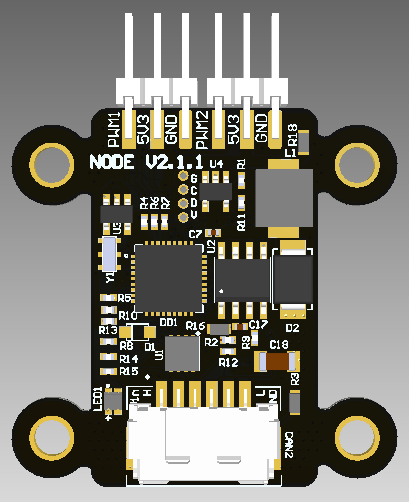 |
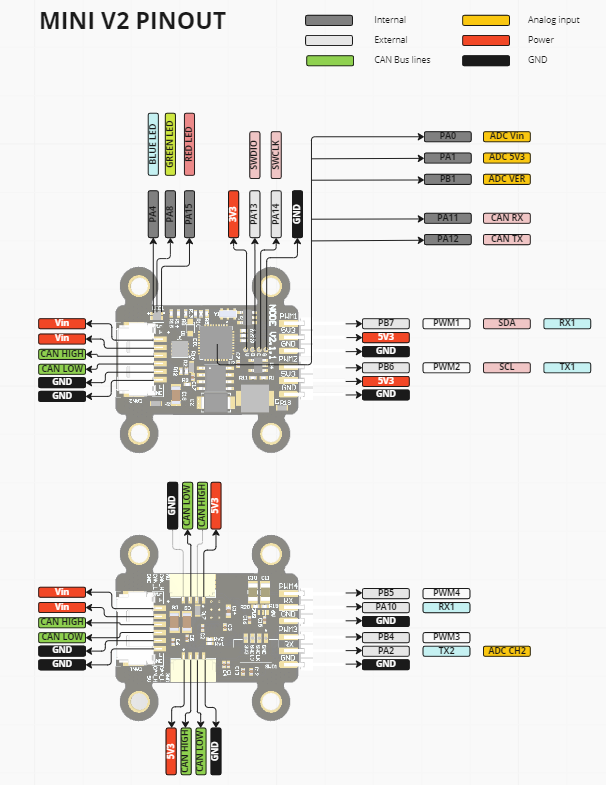 |
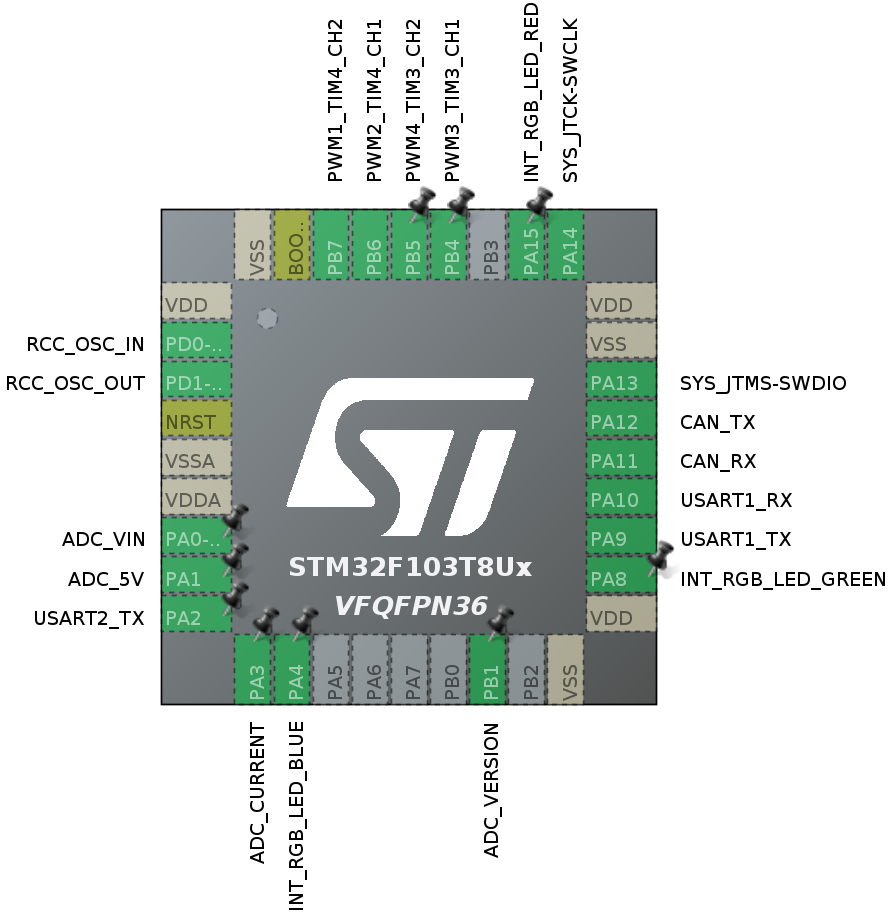 |
| Mini v3 stm32g0b1 512 KBytes flash |
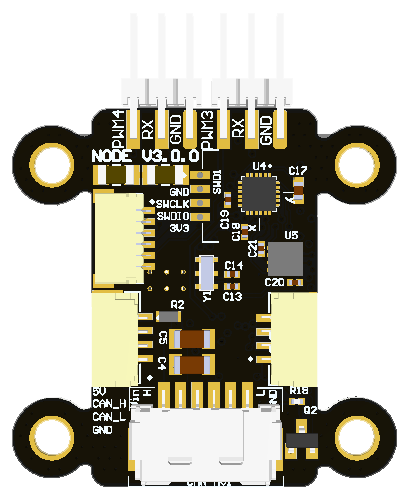 |
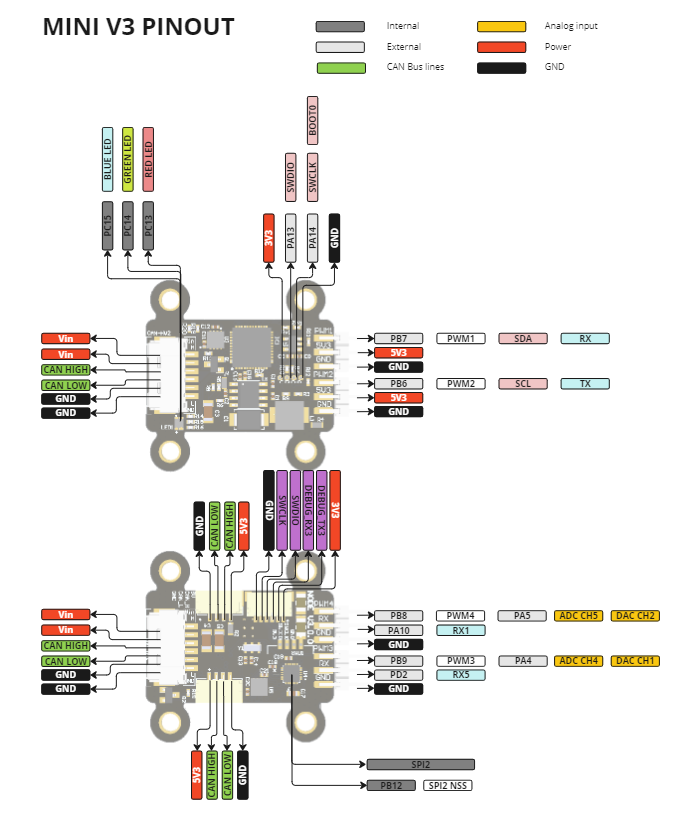 |
 |
This node is a versatile CAN-connected controller integrating PWM control, IMU sensing, and dual CAN bus communication, suitable for robotics, automation, test rigs, and other embedded systems. Below are example use cases.
| Use case | Description |
|---|---|
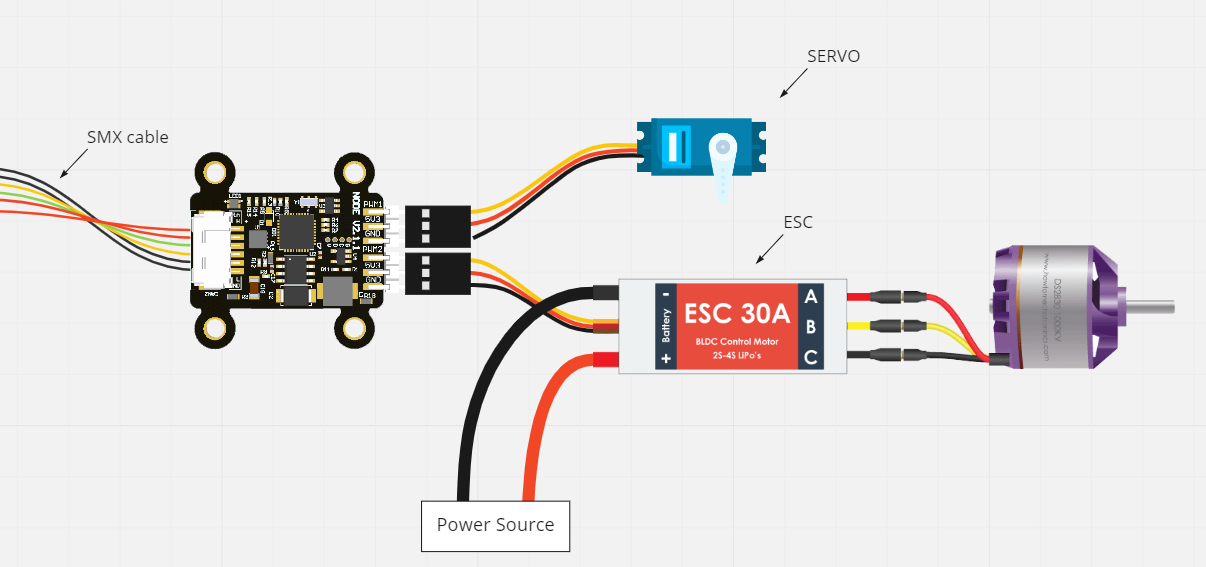 |
1. Basic ESC and Servo Control PWM1-4 to control PWM ESCs via Cyphal/CAN or DroneCAN. PWM1-2 to control 5V servos. DroneCAN interface: RawCommand / ArrayCommand. Cyphal/CAN interface: UDRAL setpoint |
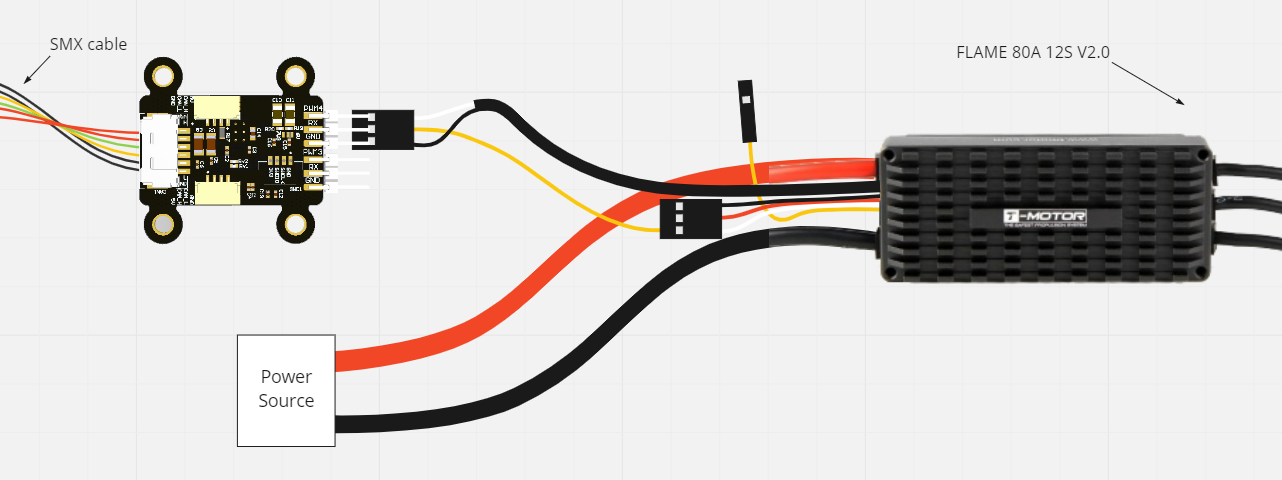 |
2. Advanced ESC Control with Feedback PWM3-4 for controlling PWM ESCs UART or ADC feedback on the FB pin. DroneCAN interface: esc.Status / actuator.Status. Cyphal/CAN interface: UDRAL Feedback |
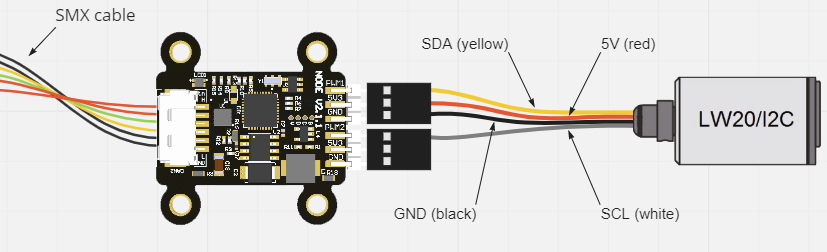 |
3. CAN-I2C Converter PWM1 and PWM2 as I2C pins. Cyphal/CAN or DroneCAN adapter for I2C peripherals. DroneCAN examples: range_sensor.Measurement. |
| 4. Camera Gimbal or Sensor Mount PWM1-2 to control a servo-based gimbal. Suitable for stabilized cameras, sensors, or inspection tooling. DroneCAN interface: camera_gimbal.AngularCommand. |
|
| 5. End Effector / Servo Latch PWM1-2 to control a servo-based latch, clamp, or lightweight end effector. Suitable for ground robots, mobile platforms, and general-purpose tooling. DroneCAN interface: hardpoint.Command. |
|
| 6. CAN-CAN converter CAN1 for Cyphal/CAN or DroneCAN. CAN2 for another CAN protocol. CAN adapter for another CAN device. Examples: KST/CAN servo, CANopen motor, CAN BMS. Keep a consistent CAN network. Supported only on Mini v3 node. |
|
| 7. Servo Position Estimation with I2C Encoder PWM3-4 for a servo PWM1-2 for a AS5600 I2C encoder. Estimate the angular position of the servo. DroneCAN interface: actuator.Status. |
|
| 8. Vibration Analysis with IMU Utilize the onboard IMU (MPU-9250) Monitor vibrations in your system. Estimate dominant frequency and magnitude of vibrations. Useful for diagnosing mechanical issues or ensuring smooth operation in robotic and embedded platforms. DroneCAN interface: ahrs.RawIMU. |
The following table outlines the compatibility of the project with different operating systems, modes, and support timelines.
| Operating System | DroneCAN Support | Cyphal Support | Notes |
|---|---|---|---|
| Ubuntu 24.04 | ✅ Supported | ✅ Supported | Latest Ubuntu LTS version. |
| Ubuntu 22.04 | ✅ Supported | ✅ Supported | Deprecated in mid-2026; unsupported in April 2027. |
| Windows (2022) | Current "latest" Windows version. | ||
| Manjaro (latest) | No longer maintained by this project; may still work. | ||
| Ubuntu 20.04 | ❌ Not Supported | ❌ Not Supported | Deprecated in 2025-04-15. |
Requirements:
- arm-none-eabi-gcc
- CMake
- Python
- STM32CubeMX/STM32CubeIDE
- st-link
Installation (Ubuntu, Manjaro, Windows):
# 1. Make a fork of the repository and clone the repository with submodules
git clone git@github.com:RaccoonlabDev/mini_v2_node.git --recursive

# 2. Install python requirements
pip install -r requirements.txt

# 3. Install other requirements (toolchains, etc.)
./scripts/install.py
Build (examples):
# DroneCAN firmware:
make rl_mini_v2_dronecan
make rl_mini_v3_dronecan

# Cyphal firmware:
make rl_mini_v2_cyphal
make rl_mini_v3_cyphal
Note: Cyphal builds require access to the private libcpnode repository. Fork CI skips Cyphal (and combined v3) builds.
See docs/build_system.md for how the Make targets and the underlying CMake build relate.
Upload/Flash:
make rl_mini_v2_dronecan upload
# or:
make rl_mini_v3_dronecan upload
SITL (Software-In-The-Loop):
make rl_sitl_dronecan run
# or:
make rl_sitl_cyphal run
GUI Tools
For full interaction with the node use:
The project is organized into three main layers to make it portable across boards:
- Peripheral Layer (Src/peripheral)
- STM32CubeMX-generated HAL code is wrapped in lightweight C++ classes.
- High-level code accesses peripherals only through the
HALnamespace. - Goal: minimize direct dependency on STM32CubeMX and ease migration to other platforms.
- Board Support / Platform Layer (Src/platform)
- Board-specific configuration (pins, ADC channels, LEDs, CAN terminators, etc.).
- High-Level Layer
- Drivers (Src/drivers) — external devices (e.g. IMU).
- Modules (Src/modules) — application logic, e.g. vibration metrics.
- Uses DroneCAN or Cyphal/CAN for communication.
Build Targets
- Build and flash using Make, for example:
make rl_mini_v3_dronecan - STM32CubeMX is used only to generate peripheral code. Application logic starts in
application_entry_point()called frommain.c.
Standards & Hardware Info
- Boards follow an internal standard for peripherals (ADC_VIN, ADC_5V, ADC_CURRENT, RGB LED, CAN_TERMINATORS, etc.). See docs/hardware.md for hardware details.
All nodes run a minimal application after flashing so you can verify the board is working without extra setup:
- CAN communication starts according to the selected build target (DroneCAN or Cyphal/CAN).
- LED indicator follows a standard pattern common to all RaccoonLab boards — see docs/led_meaning.md.
This repository can be used in three ways:
| Approach | When to Use | Summary |
|---|---|---|
| Fork (recommended) | Use it by default | One fork per user/org |
| Template (advanced) | When multiple apps are needed. | Unlimited repos per user/org, but extra steps to restore history and no automatic pull requests. |
| Framework (testing stage) | When you want to keep your application in a separate repository and reuse this repo as a submodule/vendor dependency. | Put your custom boards, modules, and drivers in your app repo and build against node-core via custom CMake/Make wrappers. |
▶ Workflow 1 — Fork (Recommended)
-
Fork this repository on GitHub (top-right “Fork” button).
-
Clone your fork:
git clone git@github.com:<your_org>/mini_v2_node.git --recursive
-
Create your feature branch from the main branch:
git checkout -b pr-my-feature origin/main
-
Push and open pull requests as usual:
git push origin pr-my-feature
✅ This is the simplest and most familiar workflow.
▶ Workflow 2 — Template (Advanced, for Multiple Apps)
-
Create a new repository from this template Click “Use this template” on GitHub → create your own repo.
-
Restore the full commit history with tags from the original repo
git remote add upstream https://github.com/RaccoonlabDev/mini_v2_node.git
git fetch --tags upstream
-
Create your feature branch from the latest available tag
git checkout -b custom-<LATEST_TAG> <LATEST_TAG> # branch named after upstream version
git push origin custom-<LATEST_TAG>
-
Optional: Add a readme branch for extended documentation or onboarding if you want to keep docs separate from code.
git checkout --orphan readme
git rm -rf .
echo "hello there" > README.md
git add README.md
git commit -m "first commit"
git push origin readme
✅ This workflow is ideal if you need multiple independent applications, separate permissions per repo, and still want to keep upstream history.
▶ Workflow 3 — Framework (Testing Stage, for Vendor/Submodule Integration)
Use this workflow when your application lives in its own repository and this repo is included as a git submodule or vendor dependency.
- Add this repository to your application repo as a submodule, for example under
third_party/node-core. - Keep your application-specific code outside this repo, typically in a layout like:
your_app/ ├── CMakeLists.txt ├── Makefile ├── third_party/node-core/ └── src/ ├── boards/<vendor>/<board>/ ├── modules/ └── drivers/ - Point the build to your external sources using
NC_APP_SRC_DIR. The build system already knows how to look there for:boards/<vendor>/<board>modules/...drivers/...
- Provide your own top-level
CMakeLists.txtorMakefilewrapper and forward the build tonode-core. A minimal example:NODE_CORE := third_party/node-core APP_SRC := $(CURDIR)/src my_board_dronecan: $(MAKE) -C $(NODE_CORE) build \ NC_BOARD=my_vendor/my_board \ NC_TARGET=dronecan \ NC_APP_SRC_DIR=$(APP_SRC) \ NC_BUILD_DIR=$(CURDIR)/build
- If you need custom aliases or board-generation helpers, define them in your application repo similarly to this repo's
Makefile.vendor. - Define board targets in
src/boards/<vendor>/<board>/<target>.cmake. The default convention is documented inSrc/boards/<vendor>/<board>/.
This workflow is useful when node-core is treated as a reusable firmware framework and your product-specific code, board definitions, and release process are maintained separately.
See docs/framework.md for the concrete step-by-step recipe and the gotchas.
Custom application versioning
- Resulting version format:
v<upstream-version>-<app-version>, e.g.v1.3.0-0.1.0(based on upstreamv1.3.0, app version0.1.0). - Fork / Template (single repo): tag with the full combined version, e.g.
v1.3.0-0.1.0. - Framework (submodule): tag your app repo with the app version only, e.g.
v0.1.0. The build derives the upstream prefix from the pinnednode-coresubmodule and produces the combinedv<upstream>-<app>automatically — so the artifact version always reflects the node-core you actually built against. Do not put the upstream version in the app tag (it would be duplicated).
If you are struggling with the software building, please refer to the build workflow build_and_deploy.yml for a hint. If it doesn't help, you can open an issue.