

Skip to content

NatLabRockies/COMPASS

Repository files navigation

Infrastructure Continuous Ordinance Mapping for Planning and Siting Systems (INFRA-COMPASS)

License Zenodo PythonV PyPi Ruff Pixi Static Badge

What is INFRA-COMPASS?

INFRA-COMPASS is an innovative software tool that harnesses the power of Large Language Models (LLMs) to automate the compilation and continued maintenance of an inventory of state and local codes and ordinances pertaining to energy infrastructure.

At a high level, INFRA-COMPASS does two things: it retrieves the right ordinance documents for each jurisdiction you ask about, and then extracts structured data from those documents into a versioned database that downstream users can query as a CSV, Excel workbook, or GeoPackage.
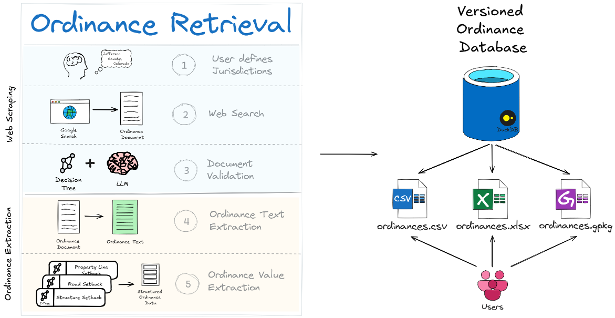
High-level overview of the INFRA-COMPASS pipeline: a user defines jurisdictions, INFRA-COMPASS performs document retrieval (web search, document validation) and ordinance extraction (text extraction, value extraction), producing a versioned ordinance database that users can consume as CSV, XLSX, or GeoPackage.

What makes INFRA-COMPASS different from simply asking ChatGPT for ordinance data is the architecture around the LLM call:

  • Structured, downstream-ready output — consistent CSV rows with stable column names, units, and feature labels that drop straight into siting and capacity-modeling tools like reV, GIS workflows, or any pipeline that needs setbacks, height limits, and noise thresholds as numbers rather than prose.
  • Decision-tree prompting — each value is extracted by walking a small graph of focused yes/no questions rather than via one mega-prompt, which keeps accuracy high on long, messy ordinance language.
  • Hallucination guardrails — cleaned text is checked against the source and dropped if it drifts too far, so fabricated values never reach the database.
  • Source-URL traceability — every record carries a URL back to the original ordinance document, so any value can be audited or spot-checked.
  • Cost control — cheap heuristic filters reject obviously irrelevant text before any LLM call runs, making it tractable to extract data across hundreds of jurisdictions.

Where is the extracted ordinance data?

The latest published ordinance datasets are available here:

The National Laboratories of the Rockies (NLR) typically runs the INFRA-COMPASS pipeline annually and publishes refreshed datasets to OpenEI.

If the technology or jurisdictions you need aren't in a published release — or you don't want to wait for the next annual refresh — you can run INFRA-COMPASS yourself on just the jurisdictions and technologies you care about.

You bring your own LLM API key. INFRA-COMPASS is built around OpenAI (client_type: "openai") and Azure OpenAI (client_type: "azure"). Set OPENAI_API_KEY (or the AZURE_OPENAI_* trio) in your environment before starting a run. Support for other LLM providers is under consideration.

Which local codes and ordinances does INFRA-COMPASS support?

INFRA-COMPASS supports several extraction plugins (the value you set as tech in the input config). Each plugin defines its own search queries, keyword heuristics, and field set. Example fields extracted are listed below:

  1. Solar (tech: "solar") — utility-scale solar siting ordinances. Examples: setbacks (from structures, property lines, roads, railroads, transmission, water, conservation lands), maximum structure height, minimum/maximum lot size, maximum project size, panel spacing, land-use density, land coverage, noise, glare, visual impact, fencing, signage, screening, decommissioning, repowering, prohibitions, plus permitted-use district lists.
  2. Wind (tech: "wind") — utility-scale wind siting ordinances. Examples: setbacks (same feature set as solar), maximum turbine height, minimum/maximum lot size, maximum project size, separation from other wind energy conversion systems (WECS), shadow flicker, tower density, blade clearance, noise, color, lighting, decommissioning, repowering, climbing prevention, signage, visual impact, prohibitions.
  3. Small wind (tech: "small wind") — distributed / residential-scale wind ordinances. Examples: setbacks (extended to also include unoccupied structures), maximum turbine height, minimum/maximum lot size, rated capacity, blade clearance, tower density, shadow flicker, noise, color, lighting, decommissioning, climbing prevention, signage, prohibitions, permitting fees.
  4. Geothermal heat pumps (tech: "ghp") — GHP / ground-source heat-pump local codes. Examples: setbacks from driveways, property lines, yards, private/public water, building foundations, wastewater, water/sewer lines, animal enclosures, roads, rights-of-way (ROW), above/below-ground fuel, subsurface drains, wetlands, pools, hazardous materials; minimum/maximum well depth, noise, well/geothermal/GHP definitions, licensed-driller and certification requirements, screening, permits, inspections, decommissioning, prohibitions.
  5. Texas water rights (tech: "tx water rights") — multi-document extraction tailored to TX water-rights filings. Examples: permit requirements, extraction requirements, well spacing, drilling window, metering devices, district/well drought-management plans, plugging requirements, external-transfer requirements, production reporting, production cost, setbacks, redrilling, plus daily/monthly/annual withdrawal limits.

The following plugins are under active development:

  1. Geothermal electricity (tech: "geothermal") — Coming Soon.
  2. Transmission lines (tech: "transmission") — Coming Soon.
  3. Data centers (tech: "data centers") — Coming Soon.
  4. Natural gas (tech: "natural gas") — Coming Soon.

In addition, INFRA-COMPASS supports a one-shot, schema-driven plugin for arbitrary ordinance types: provide a JSON schema for the fields you want and INFRA-COMPASS will use LLM structured outputs to do a single-call extraction without writing decision trees. See the one-shot schema extraction example for a walkthrough.

How does INFRA-COMPASS find the codes and ordinances?

A jurisdiction in INFRA-COMPASS is the place that issues the ordinance — typically a U.S. county (or equivalent), e.g. "Boulder County, Colorado." Each run is driven by a CSV of jurisdictions you want covered.

The retrieval flow is summarized below. INFRA-COMPASS first gathers candidate documents from several possible sources, then uses an LLM-driven filter to keep only those that are legally binding, pertain to the correct jurisdiction, and contain the relevant technology regulations.

Document retrieval flow. From a user-supplied jurisdiction (e.g. 'Jefferson County, Colorado'), Step 1 web-scrapes via search engine or website crawl; Step 2 downloads the document collection; Step 3 runs an LLM filter as a series of decision-tree questions ('Is the document a legal ordinance?', 'Does it pertain to the correct jurisdiction?', 'Does it contain relevant technology regulations?') to produce a confirmed ordinance document.

In practice, INFRA-COMPASS can find source documents in four different ways:

  1. Known local docs — any documents you already have on hand for the jurisdiction.
  2. Known URLs — links containing documents from which you want to pull data.
  3. Targeted document search — plugin-defined queries that directly look for the ordinance document itself. Best for ordinances that are well-indexed by search engines as standalone PDFs or pages.
  4. Jurisdiction-website crawl — for ordinances buried inside a county or municipal website. INFRA-COMPASS first finds the jurisdiction's official website, then crawls it for ordinance text using plugin-defined heuristics.

How does INFRA-COMPASS extract the data?

Once a candidate document is in hand, INFRA-COMPASS reduces it to just the passages that actually pertain to the target technology, and then walks a small decision tree per ordinance feature to read structured values out of those passages.

Document extraction flow. Step 1 (Ordinance Text Extraction) takes an ordinance document, splits it into text chunks, runs each chunk through an LLM content filter, and concatenates the relevant chunks into a single cleaned 'ordinance text.' Step 2 (Ordinance Value Extraction) feeds that cleaned text to a separate decision tree for each ordinance feature (e.g. Max Shadow Flicker, Property Line Setback, Road Setback, Structure Setback), producing structured ordinance data.

The full pipeline is designed to keep cost down and hallucinations out:

  1. Cheap keyword filter — rejects sections that obviously aren't ordinance text before any LLM call.
  2. Legal-text validation — an LLM classifies each surviving section as legally-binding regulation or not, with surrounding context for borderline cases.
  3. Relevant-text extraction — each document is filtered down to just the passages that actually pertain to the target technology, producing a much shorter cleaned text that later steps work from.
  4. Hallucination guardrail — the cleaned text is compared back to the original; if too much has been invented or paraphrased away, INFRA-COMPASS retries and ultimately drops the document rather than passing fabricated text to the next step.
  5. Decision-tree prompting — rather than asking the LLM to fill out a whole row of values in one mega-prompt, INFRA-COMPASS extracts each value by walking a small decision tree of focused yes/no questions over the cleaned text. For a setback value, that might look like: "Does this text mention a setback from property lines for utility-scale solar?" → if yes, "Is the value given as a fixed distance, a multiple of system height, or relative to another feature?" → "What are the units?" → "What is the numeric value?" Each answer narrows the next question, and the conversation history carries forward so later prompts know what was already decided. This breaks an ambiguous extraction task into a sequence of unambiguous ones — which is what keeps structured output accurate even on messy ordinance language.
  6. Structured parsing — extracted values are assembled into a tidy per-jurisdiction CSV row (one row of setbacks, height limits, lot sizes, and the rest), then merged across all jurisdictions into the final ordinance database — published as CSV, Excel workbook, and GeoPackage. Each row records the source URL of the document it came from, so any extracted value can be traced back to the original ordinance text and independently verified.

Jurisdictions are processed concurrently while respecting your API provider's rate limits, with live cost tracking on a progress bar.

How can I expand INFRA-COMPASS to cover other ordinances?

Two paths, depending on how much customization you need:

  • Schema-driven (fastest) — write a JSON schema describing the fields you want and pass it to compass process --plugin path/to/schema.json. No Python required. Walkthrough: one-shot schema extraction example.
  • Full plugin (most control) — implement a custom extraction plugin with your own search queries, heuristics, text collectors, and structured-data parsers. The solar plugin is the cleanest reference to copy and adapt.

See the development guides for full details: plugin development and advanced plugin development.

Installing INFRA-COMPASS

The quickest way to install INFRA-COMPASS for users is from PyPi:

pip install infra-compass

If you would like to install and run INFRA-COMPASS from source, we recommend using pixi:

git clone git@github.com:NatLabRockies/COMPASS.git; cd COMPASS
pixi run compass

Before performing any web searches (i.e. running the INFRA-COMPASS pipeline), you will need to run the following command:

playwright install

If you are using pixi, don't forget to prefix this command with pixi run or initialize a shell using pixi shell. For detailed instructions, see the installation documentation.

Quickstart

To run a quick INFRA-COMPASS demo, set up a personal OpenAI API key and run:

pixi run openai-solar-demo <your API key>

This will run a full extraction pipeline for two counties using gpt-4o-mini (costs ~$0.45). For more information on configuring an INFRA-COMPASS run, see the execution basics example.

Development

Please see the Development Guidelines if you wish to contribute code to this repository.

About

INFRA-COMPASS is a tool that leverages Large Language Models (LLMs) to create and maintain an inventory of state and local codes and ordinances applicable to energy infrastructure.

Topics

Resources

License

Stars

Watchers

Forks

Packages


Contributors

Languages