





Dependency graphs, cycle reports, and outgoing dependency limits for Rust projects. Exports GraphML, Mermaid, and DOT.
Folder dependencies in this repository's crates/source-mesh-core/src, with test-only dependencies excluded and no folder grouping.
The . node represents files directly in src.
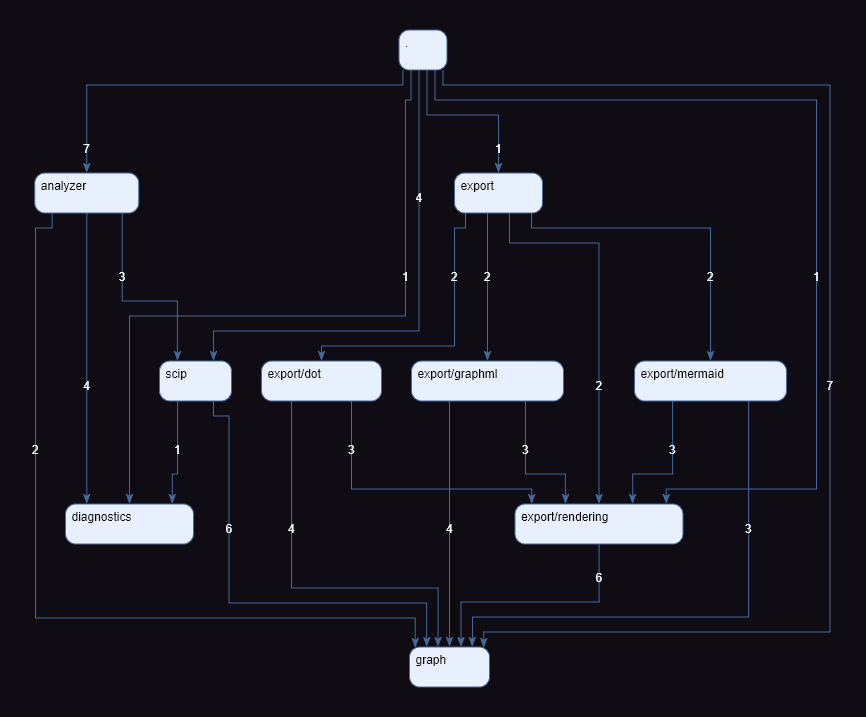
To recreate the diagram above, export the graph as GraphML from the root of this repository:
source-mesh . --no-settings --root crates/source-mesh-core/src --format graphml --exclude-tests --output source-mesh-core.graphmlThen open source-mesh-core.graphml in yEd.
From the project you want to analyze, install the analysis components and the latest release:
rustup component add rust-analyzer rust-src
cargo install source-mesh --lockedFrom the Rust project you want to analyze:
source-mesh . --root src --format graphml --exclude-tests --output folders.graphmlView the output with a tool for its format:
- DOT: Graphviz.
- GraphML: yEd.
- Mermaid: Mermaid Live Editor.
Arrows show dependency direction: A → B means code in folder A uses code from folder B. Edge labels count distinct file pairs. Folder aggregation can introduce cycles even when the file graph is acyclic.
Analysis of large projects can take several minutes. Use --verbose for diagnostic details and source-mesh --help for all options.
To find and highlight cycles:
source-mesh . --root src --format graphml --exclude-tests --highlight-cycles --cycles-output folder-cycles.md --file-cycles-output file-cycles.md --output folders.graphml| Option | Effect |
|---|---|
--depth 1 |
Only folders immediately below --root (default: all depths) |
--group-folders |
Show subfolders inside their parent groups |
--format dot / --format mermaid |
Export another diagram format |
--exclude-tests |
Omit dependencies found only with test configuration enabled |
--exclude 'src/generated/**' |
Remove matching files and their incoming/outgoing dependencies; repeat for multiple patterns |
--settings FILE |
Load an explicit TOML configuration instead of the project's source-mesh.toml |
--no-settings |
Disable TOML configuration loading |
--highlight-cycles |
Give each connected group of cycles a distinct color |
--fail-on-cycles |
Exit unsuccessfully when file or folder cycle groups are found, after writing requested outputs |
--cycles-output FILE |
Write folder cycle chains to Markdown |
--file-cycles-output FILE |
Write file cycle chains before folder aggregation |
--max-outgoing-dependencies N |
Fail when a file or folder has more than N distinct outgoing targets |
--outgoing-dependencies-mode files|folders |
Select the threshold check's scope (default: folders) |
--outgoing-dependencies-output FILE |
Write outgoing dependency violations to Markdown; requires a threshold |
--verbose / -v |
Include diagnostic details and timings |
source-mesh.toml is loaded automatically from the selected project directory (current directory by default).
Use --settings FILE to choose another file or --no-settings to skip it. All settings are optional:
[graph]
root = "."
depth = 3
include-self = false
exclude-tests = true
exclude = ["crates/*/src/generated/**", "**/fixtures/**", "crates/server/src/compat.rs"]

[export]
format = "graphml"
output = "folders.graphml"
group-folders = true

[cycles]
highlight-cycles = true
fail-on-cycles = true
cycles-output = "folder-cycles.md"
file-cycles-output = "file-cycles.md"
cycle-limit = 10000

[outgoing-dependencies]
maximum = 10
mode = "folders"
output = "dependencies.md"

[analysis]
verbose = false- Priority: explicit CLI values > TOML values > built-in defaults. Use
--flag=falseto disable a configured flag. - Paths: file paths in TOML are relative to its directory; CLI file paths are relative to the working directory.
rootremains project-relative. - Exclusions: CLI
--excludevalues replace the TOML list, rather than append to it.
[analysis] also accepts from-scip, save-scip, and config (the rust-analyzer JSON configuration).
--exclude / [graph].exclude remove matching files and their dependencies from diagrams and all checks, not from indexing.
Patterns are case-sensitive and project-relative (not relative to --root), with / separators.
Use src/generated/** for a directory tree or **/fixtures/** for fixture directories at any depth. .gitignore is not used.
Limit each folder to at most five distinct dependency targets:
source-mesh . --root src --exclude-tests --max-outgoing-dependencies 5 --outgoing-dependencies-output dependencies.md --output folders.dotUse --outgoing-dependencies-mode files to check files instead of folders. A limit of 0 forbids outgoing dependencies.
Both modes respect --root, --exclude-tests, and --exclude.
On a violation, source-mesh writes the diagram and requested reports, lists violations in stderr, and exits with code 1.
--fail-on-cycles makes cycle detection fail the CI step after writing the requested outputs.
The workflow below publishes reports in the run summary and uploads diagnostics when the cycle check fails.
Copy the summary helper
to scripts/Publish-CycleSummary.ps1 in your repository.
jobs:
  dependency-cycles:
    runs-on: ubuntu-latest

    steps:
      - uses: actions/checkout@v7.0.1
        with:
          persist-credentials: false

      - run: rustup component add rust-analyzer rust-src

      - name: Install source-mesh
        run: cargo install source-mesh --locked

      - name: Check dependency cycles
        id: dependency_cycles
        run: |
          mkdir -p target/source-mesh
          source-mesh . \
            --root src --format graphml --exclude-tests \
            --highlight-cycles --fail-on-cycles \
            --cycles-output target/source-mesh/folder-cycles.md \
            --file-cycles-output target/source-mesh/file-cycles.md \
            --output target/source-mesh/folder-dependencies.graphml

      - name: Publish cycle summary
        if: >-
          ${{ always() && (steps.dependency_cycles.outcome == 'success' || steps.dependency_cycles.outcome == 'failure') }}
        shell: pwsh
        run: >-
          ./scripts/Publish-CycleSummary.ps1 -SummaryPath $env:GITHUB_STEP_SUMMARY
          -ReportPaths target/source-mesh/folder-cycles.md,target/source-mesh/file-cycles.md

      - name: Upload cycle diagnostics
        if: ${{ always() && steps.dependency_cycles.outcome == 'failure' }}
        uses: actions/upload-artifact@v7.0.1
        with:
          name: source-mesh-cycle-diagnostics
          path: target/source-mesh
if-no-files-found: warnSave analysis with --save-scip analysis.scip; reuse it with --from-scip analysis.scip to change formats, depth, or filters without analyzing the source again.