Atlas is a local architecture intelligence engine for NestJS projects, developed by Digital Threads. It scans source code, builds a typed graph of the application, highlights architectural risks, and provides a browser viewer and MCP tools for exploring the result.
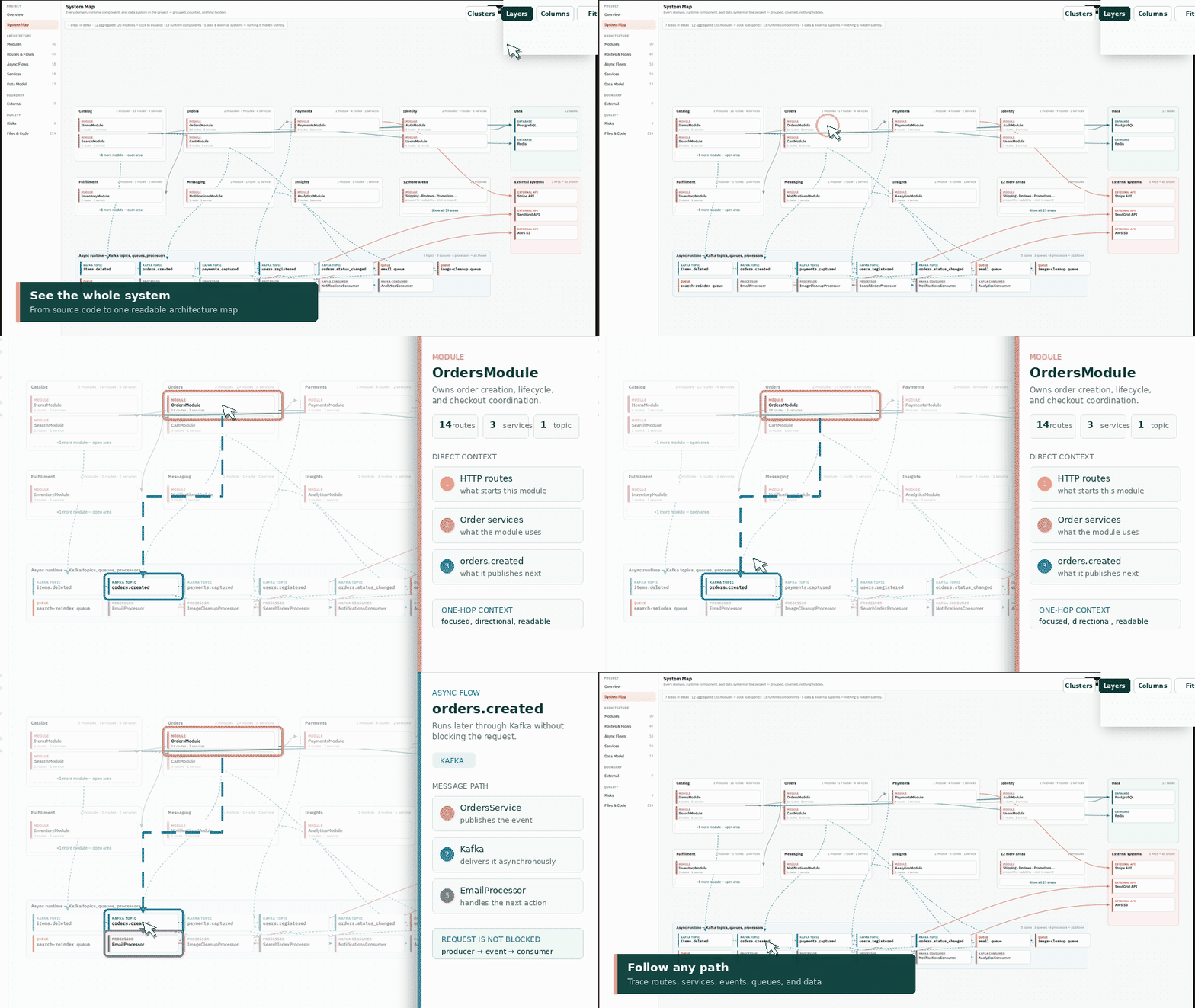
Atlas helps answer practical questions about an unfamiliar backend:
- Which route calls which controller, service, and database table?
- Which code publishes to a Kafka topic, which consumer receives it, and what runs next?
- Which Bull queues and processors perform background work?
- Which cron jobs run, when do they start, and what do they trigger?
- What tables, columns, indexes, constraints, and migrations make up the data model?
- How do ClickHouse tables, materialized views, engines, partitions, sort keys, and TTL rules connect?
- What does delivery and runtime look like in development, staging, and production?
- How are NestJS modules and providers connected?
- Which environment variables and external APIs does the project use?
- Which services have no detected tests?
- Where are circular imports, direct database access, or incomplete route flows?
Everything runs locally. Atlas does not upload source code or collect telemetry. It
never stores values from real .env files or Kubernetes Secrets; safe non-secret
sample values from .env.example may be included as configuration documentation.
- Node.js 22.13 or newer
- A NestJS project written in TypeScript or JavaScript
Once the package is published to npm, install it globally:
npm install --global @dthreads/atlasYou can also run Atlas without a global installation:
npx @dthreads/atlas --helpFor local development from this repository:
git clone https://github.com/Digital-Threads/atlas.git
cd atlas
npm install
npm run build:cli
node dist/cli/index.js --helpRun Atlas from the root of a NestJS project:
atlas scan
atlas open
Or scan another directory:
atlas scan --path ../my-nest-app
atlas open --path ../my-nest-app
The scan creates a .atlas directory inside the analyzed project. atlas open
opens its static viewer in the default browser. If the browser restricts local
files, use the built-in local server:
atlas serve --path ../my-nest-app --port 4317 --openThen open http://localhost:4317.
Scans a project and writes the graph, metadata, risks, report, and viewer.
atlas scan [--path <project>] [--output <directory>] [--no-cache] [--debug]--path defaults to the current directory. --output defaults to .atlas
relative to the project root. Use --debug to print non-fatal analyzer warnings.
When you choose a custom output directory, pass the same --output value to
open, serve, report, and mcp.
Atlas keeps a local file manifest and reuses the generated architecture graph when
the supported source and configuration files have not changed. A warm scan avoids
parsing the project again. Use --no-cache after changing analyzer configuration or
whenever you explicitly want a complete scan:
atlas scan --path ../my-nest-app --no-cacheThe scanner respects rules from the project's root .gitignore. It also skips
dependencies, generated output, caches, temporary directories, Git worktrees,
symbolic links, and its own output directory. Nested .gitignore files are not
currently evaluated separately.
Merges locally observed runtime links with the static graph and regenerates the viewer. Existing static links are marked as runtime-confirmed; newly observed links remain clearly identified as runtime evidence.
atlas merge-runtime [--path <project>] [--output <directory>] [--input <runtime.jsonl>]The default input is <project>/.atlas/runtime.jsonl. Payloads, request bodies,
headers, message contents, and environment values are not recorded.
Opens <project>/.atlas/viewer/index.html in the default browser.
atlas open [--path <project>] [--output <directory>]Serves the generated viewer on localhost. No files are sent to an external server.
atlas serve [--path <project>] [--output <directory>] [--port 4317] [--open]Regenerates .atlas/report.md from the current graph and risk data.
atlas report [--path <project>] [--output <directory>]Starts a Model Context Protocol server over standard input/output.
atlas mcp [--path <project>] [--output <directory>]The NestJS adapter currently detects:
- projects, folders, files, packages, and imports;
- modules, controllers, services, providers, and dependency injection;
- DI token bindings through
@Inject,useClass,useExisting, anduseFactory, including factory dependencies; forwardRef,forRoot,forRootAsync,register, andregisterAsyncmodule wiring;- routes, controller methods, service methods, and method calls;
- Kafka publishers and consumers declared with
ClientKafka, KafkaJS,@MessagePattern, and@EventPattern; - NestJS CQRS command, query, and event bus calls linked to their handlers;
- in-process events declared with
EventEmitter2and@OnEvent; - RabbitMQ handlers declared with
@RabbitSubscribeand@RabbitRPC; - Bull and BullMQ queues, producers, processors, and jobs;
- DTO fields, types, optional flags, validation decorators, and custom NestJS decorators;
- guards, pipes, interceptors, and middleware;
- Prisma, TypeORM, Sequelize, and Drizzle tables, columns, relations, indexes, constraints, and operations;
- SQL migrations, columns, indexes, keys, constraints, and foreign-key relationships;
- ClickHouse tables, materialized views, engines, partition/order keys, and TTL rules;
- NestJS cron/interval/timeout jobs, repeatable queue jobs, and Kubernetes CronJobs;
- GitHub Actions and GitLab CI workflows, jobs, dependencies, images, and deploy commands;
- Dockerfiles, Compose services, and Kubernetes workloads, containers, probes, services, ingress, ConfigMaps, and Secret names;
- environment variable contracts and safe examples, while redacting secret-like values;
- external HTTP API hosts;
- unit test relationships;
- all seven MVP architecture risks: excessive service dependencies, missing service tests, too many external APIs, circular imports, large controllers, direct controller database access, and routes with no detected service flow.
Static analysis has limits. Runtime-generated providers, reflection, and indirect calls may not always be resolved from source alone. Every inferred graph item includes its source and confidence. Optional runtime evidence can confirm important paths without replacing or hiding the static evidence.
Static analysis should remain the default. For local development or integration tests, Atlas also exports a small NestJS interceptor that records route/RPC handler transitions. It only records graph identifiers, timestamps, and counters.
import {
  createNestRuntimeInterceptor,
  RuntimeTracer,
} from "@dthreads/atlas";

const tracer = new RuntimeTracer({
  outputPath: ".atlas/runtime.jsonl",
});

app.useGlobalInterceptors(createNestRuntimeInterceptor(tracer));
Call await tracer.flush() from the application's normal shutdown hook. Internal
transitions that cannot be observed by a NestJS interceptor can be recorded
explicitly:
tracer.edge(
  "method:CheckoutService.checkout",
  "message_topic:orders.created",
  "publishes_to",
);
Run the application or its integration tests, then merge the observations:
atlas merge-runtime
atlas serve
Runtime tracing is opt-in and local. Do not commit runtime.jsonl when architecture
names are confidential.
.atlas/
  cache/
    files.json      Local incremental-scan manifest
  graph.json       Typed nodes and relationships
  metadata.json    Scan time, file counts, stack evidence
  risks.json       Detected risks and recommendations
  report.md        Human-readable architecture summary
  runtime.jsonl    Optional local runtime observations
  viewer/
    index.html                    Offline architecture application
    atlas-data.js                Real scan data adapted to semantic scenes
    support.js                   Local viewer runtime
    react.production.min.js      Local UI runtime
    react-dom.production.min.js  Local UI renderer
    graph.json                   Raw typed architecture graph
The viewer works without a cloud backend. Deterministic scenes cover the system map, request and asynchronous flows, complete data catalog and focused table ERD, migrations, scheduled jobs, source files, risks, deployment, runtime topology, environment comparison, and configuration contracts.
Operations are deliberately separated. Deployment follows CI/CD jobs, Docker build stages, images, and releases. Runtime follows ingress, services, workloads, containers, ConfigMaps, and Secret names. Both switch independently between development, staging, and production. Environments compares those scopes without mixing their complete topologies into one unreadable map. Secret values are never stored or displayed.
Large scenes use adaptive detail: off-screen elements are not rendered, distant cards switch to a lightweight form, edge labels appear when useful, and animation is bounded. Catalogs load in pages and remain fully searchable, so a large project does not need thousands of DOM elements just to open one focused flow.
The interactive viewer UX reference is stored in
docs/design/atlas-viewer-prototype.html.
It serves as the visual design specification. Generated viewers use the same
interface with real scan results from atlas-data.js; no demonstration project
entities are copied into a scan.
First scan the project, then configure an MCP-compatible client to launch Atlas. For a globally installed package:
{
  "mcpServers": {
    "atlas": {
      "command": "atlas",
      "args": ["mcp", "--path", "/absolute/path/to/project"]
    }
  }
}
Without a global installation:
{
  "mcpServers": {
    "atlas": {
      "command": "npx",
      "args": ["-y", "@dthreads/atlas", "mcp", "--path", "/absolute/path/to/project"]
    }
  }
}
The server exposes these tools:
atlas_find_nodeatlas_get_nodeatlas_get_dependenciesatlas_get_dependentsatlas_find_routesatlas_find_flowatlas_find_async_flowsatlas_find_async_flowatlas_find_tablesatlas_find_data_modelatlas_get_table_profileatlas_find_migrationsatlas_find_schedulesatlas_find_deliveryatlas_find_environmentsatlas_find_external_apisatlas_searchatlas_project_summary
The MCP server only reads the generated .atlas/graph.json file. It does not need a
token or network connection.
Install dependencies and run the complete check:
npm install
npm run check
Useful commands:
npm run dev          # public Next.js website
npm run dev:cli -- scan --path ./tests/fixtures/nest-app
npm run build:cli    # CLI and library package
npm run build:website
npm test
npm run test:performance
npm run lint
npm run typecheck
The tests scan a representative NestJS fixture, validate route-to-database, publisher-to-consumer, DI-token, CQRS, runtime, migration, schedule, and delivery flows, exercise all 18 MCP tools, verify architecture and deployment risks, and confirm that real secret values never enter generated artifacts. The performance suite generates 1,000 TypeScript files, 100 controllers, 300 services, and 1,000 routes; it also checks warm-scan reuse, indexed graph queries, viewport culling, and bounded animation.
The detailed MVP requirements and their automated evidence are listed in
docs/PRD-COMPLIANCE.md.
- Analysis and visualization are local by default.
- Environment variable names may appear in the graph. Real values and secret-like
samples never do; safe values from
.env.examplecan be shown as documentation. - Kubernetes Secret keys may appear, but Secret values never do.
.env, source files, and graph data are never uploaded by Atlas.- The local viewer server binds to loopback only.
- There is no telemetry or account system.
Review generated artifacts before publishing them because filenames, route names, API hosts, and source previews can still describe internal architecture.
Issues and pull requests are welcome. Keep changes focused, add tests for changed
analysis behavior, and run npm run check before opening a pull request.
MIT, maintained by Digital Threads.