Sting is a collection of Characters.
# syntex:-
    variable = "some_string"
# example:
userName = "AdminUser"core concept
Everything in python is well organized and everything has a number attached to it.
we can access that element directly using that number. In this case, String have a index number attached, the number starts from the 0
example :-
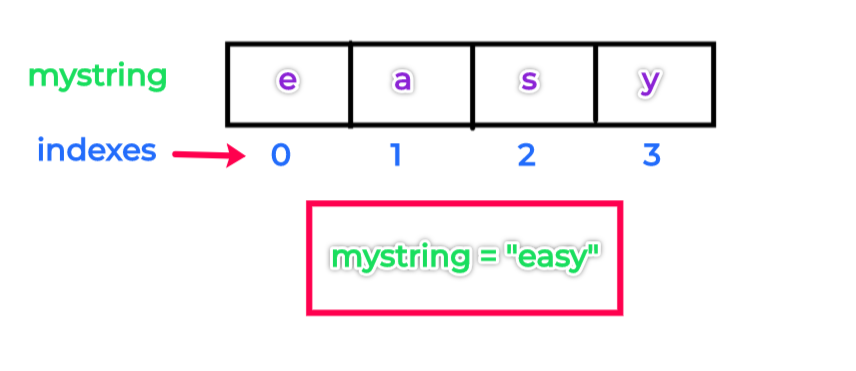
There are two types of Indexing Forward and Backward.
In Forward, the index starts from 0 to the end. In Backward, the index starts from -1 to the end.
example :-
Example:-
strindex = "Python"

print([0])
print([1])
print([-2])
print([-3])

output:-
P
y
o
has we all know Slicing meains to cut something in to pieces, like taking a piece of cake.
in this case we slice the string in to peices
# syntex:-
    myString = "python"

    print(myString[1:4])

# output:-
    yth
new Topic Time
Okayyyyyy, String Formatting is something that we always use in coding. We manipulate the input and output
click here or open the stringFormatting.py file from week-1 to see the reference code :-
String formatting is the process of infusing things in the string dynamically and presenting the string. There are four different ways to perform string formatting:-
- Formatting with % Operator.
- Formatting with format() string method.
- Formatting with string literals, called f-strings.
- Formatting with String Template Class
It is the oldest method of string formatting. Here we use the module % operator. The symbol % is also known as the “string-formatting operator”.
x = 'Some String'

print("%s", x)
output :-
Some String
note:- we don't this, so you can skip it if u want. Lets continue!!
Format() method was introduced with Python3 for handling complex string formatting more efficiently.
Formatters work by putting in one or more replacement fields and placeholders defined by a pair of curly braces { } into a string and calling the str.format().
The value we wish to put into the placeholders and concatenate with the string passed as parameters into the format function.
print(‘String here {} then also {}’.format(‘something1′,’something2’))example:-
print('We all are {}.'.format('equal'))PEP 498 introduced a new string formatting mechanism known as Literal String Interpolation or more commonly as F-strings (because of the leading f character preceding the string literal). The idea behind f-strings is to make string interpolation simpler.
To create an f-string, prefix the string with the letter “ f ”. The string itself can be formatted in much the same way that you would with str.format(). F-strings provide a concise and convenient way to embed python expressions inside string literals for formatting.
# syntex:-
print(f'text {someVariable}')
# example:-
yourName = "winter_x64"
print(f'my name is {yourName}')
# output:-
'my name is winter_x64'now we mostly use F-string, so make sure your learn it