

Generate barcodes in React Native and Expo apps with TypeScript support. Encode formats such as CODE128, EAN-13, and UPC with JsBarcode, and render them with react-native-svg.
Customize bar colors, dimensions, and text labels, with typed format names and validation errors you can handle in your app.
For Expo projects:
npm install react-native-barcode-expo
npx expo install react-native-svg
For bare React Native, install this package and a compatible react-native-svg version, run npx pod-install for iOS, and rebuild the native app.
import Barcode from 'react-native-barcode-expo';

<Barcode value="Hello World" format="CODE128" />
You can find more info about the supported barcodes in the JsBarcode README.
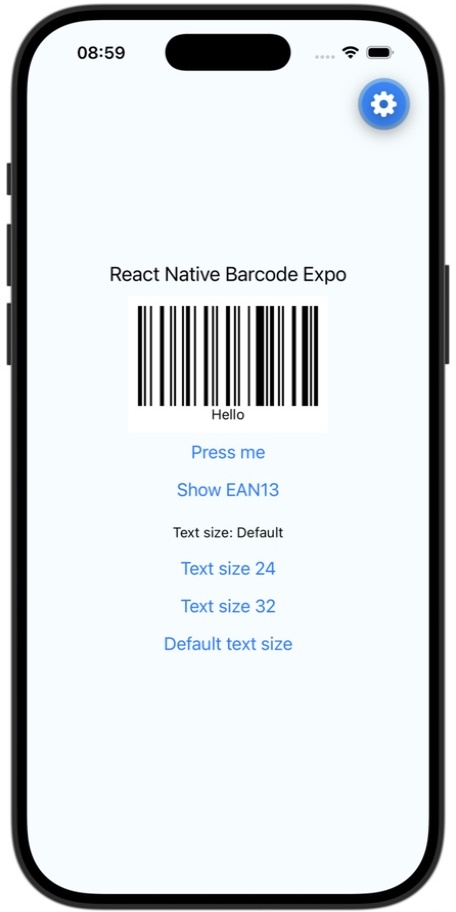
Only value is required. All other props are optional.
| Property | Type | Default | Description |
|---|---|---|---|
value |
string |
Required | Non-empty data to encode. It must be valid for the selected format. |
format |
BarcodeFormat |
"CODE128" |
Barcode format supported by JsBarcode, such as CODE128, CODE39, or EAN13. |
width |
number |
2 |
Width of a single bar, rather than the total barcode width. |
height |
number |
100 |
Height of the barcode bars. |
text |
string |
Not displayed | Label below the barcode. Pass text={value} to display the encoded value; this does not change the encoded data. |
textSize |
number |
React Native default | Font size of the label. Has no effect unless text is provided. Omitting it preserves the default text size. |
textColor |
string |
"#000000" |
Label color. |
lineColor |
string |
"#000000" |
Bar color. |
background |
string |
"#ffffff" |
Background color. |
onError |
(error: Error) => void |
Not set | Called for an empty value, an unsupported format, or data invalid for the selected format. Without a handler, these validation errors are thrown. |
To customize the label size:
<Barcode value="Hello World" text="Hello World" textSize={24} />Changing textSize updates the label without changing the encoded barcode.
The format prop uses the exported BarcodeFormat union, so your editor can suggest valid names and TypeScript catches misspellings such as "EAN-13":
import Barcode, { type BarcodeFormat } from 'react-native-barcode-expo';

const format: BarcodeFormat = 'EAN13';

<Barcode value="5901234123457" format={format} />;
Supported names are case-sensitive:
| Family | Formats |
|---|---|
| Code 128 / Code 39 | CODE128, CODE128A, CODE128B, CODE128C, CODE39 |
| EAN / UPC | EAN13, EAN8, EAN5, EAN2, UPC, UPCE |
| Interleaved 2 of 5 | ITF, ITF14 |
| MSI | MSI, MSI10, MSI11, MSI1010, MSI1110 |
| Other | pharmacode, codabar |
When upgrading existing TypeScript code, annotate format variables or state with BarcodeFormat instead of string. Validate external strings before treating them as a BarcodeFormat; a type assertion does not validate API data. JavaScript callers still receive runtime validation through onError, and each format still requires suitable barcode data.
Use format="EAN13" (without a hyphen) and numeric data. JsBarcode accepts 12 digits and calculates the final checksum digit, or 13 digits with a valid checksum. Hello World is not valid EAN-13 data.
<Barcode
  value="5901234123457"
  format="EAN13"
  text="5901234123457"
  onError={(error) => console.warn(error.message)}
/>
value="590123412345" produces the same bars because its checksum is 7. The optional text label is displayed exactly as supplied; it is not automatically updated with the checksum.
EAN/UPC sections are combined into one barcode with uniform bar heights; labels use the same text and textSize props as other formats. No flat prop is needed or supported by this component.
For example, EAN13 requires valid numeric data, so ABC triggers onError. Handle the error and show a message instead of leaving a barcode on screen:
import React, { useState } from 'react';
import { Text, View } from 'react-native';
import Barcode from 'react-native-barcode-expo';

export default function BarcodeExample() {
  const [error, setError] = useState(null);

  return (
    <View>
      {error ? (
        <Text>{error}</Text>
      ) : (
        <Barcode
          value="ABC"
          format="EAN13"
          onError={(error) => setError(error.message)}
        />
      )}
    </View>
  );
}
If your UI lets users correct the input, clear the error when they submit a new value so the barcode can mount again.
Version 3 moves react-native-svg from a fixed dependency to a peer dependency. Install it explicitly in your app so its JavaScript and native versions match your Expo SDK:
npm install react-native-barcode-expo@^3.0.0
npx expo install react-native-svg
npx expo install --check
For bare React Native, install a react-native-svg version compatible with your React Native version, run npx pod-install for iOS, and rebuild the native app. If you use an Expo development build, rebuild it after changing the native SVG dependency.
The default component import is unchanged. If you use TypeScript, update format variables to the BarcodeFormat type as described above.
React, React Native, and react-native-svg are peer dependencies supplied by your app:
| Dependency | Supported peer range |
|---|---|
| React | 18 or 19 |
| React Native | >=0.69.0 <1.0.0 |
| react-native-svg | >=13.0.0 <16.0.0 |
The example targets Expo SDK 57. iOS Simulator testing covers this SDK; Android and web have been checked by bundling only. Other SDK combinations and physical devices have not been runtime-tested. Use npx expo install react-native-svg to select the version compatible with your Expo SDK; the peer ranges alone do not guarantee compatibility for every combination.
See the contributor guide for local development, testing, and release instructions.
Licensed under the Apache License 2.0.
Based on react-native-barcode-builder. Original copyright: 2017 Arthur Wang.