class: title
The Survival Guide of Building Huge App
CJ Lin
???
This talk is not about lower overall build time
It's about tips of faster dev/verification cycle
Let's start it!
.left-column-80[
struct Profile {

    let name = "CJ Lin"

    var identity = "iOS Nerd"

    var company = "LINE"

    var blog = "https://ejameslin.github.io"

    var github = "https://github.com/eJamesLin"

    var line = "ejameslin"

    var twitter = "@eJamesLin"
}
]
.right-column-20[


 ]
]
class: blank
.vertical-center.center[
]
???
Minimize the number of rebuild
--
--
.grey[
]
-
LLDB and Breakpoints
-
Modify control flow without rebuild
.vertical-center.center[
 ]
]
.vertical-center.center[
 ]
]
-
LLDB + REPL
-
Read-Eval-Print-Loop (REPL)
-
Access public functions and global variables
-
Inject new functions
.vertical-center.center[
 ]
]
- Type
replto enter
.center[
 ]
]
- Inject new function
.center[
 ]
]
- Call the function and verify
.center[
 ]
]
- Prefix
:to run LLDB command
.center[
 ]
]
- Type single colon to return back to LLDB
.center[
 ]
]
- Modify variable by calling the injected function
.center[
 ]
]
- In the code todo
- Implement a view model to download API json
.center[
 ]
]
- Type
ein LLDB to enter multi-line expressions
.center[
 ]
]
- Inject ViewModel and API code
.center[
 ]
]
- Json URL
.center[
 ]
]
- Download
.center[
 ]
]
- Runloop handling at LLDB
.center[
 ]
]
- Call the injected function
.center[
 ]
]
- Inspect the result
.center[
 ]
]
.grey[
]
.grey[
]
???
.center[
 ]
]
.center[
 ]
]
???
MacBook Pro (15-inch, 2017)
3.1 GHz Intel Core i7
16 GB 2133 MHz LPDDR3
--
.center[
 ]
]
???
Build time quickly disappear for indexing after build at Xcode title bar...
class: blank
.vertical-center.center[
]
.center[
 ]
]
???
Feature could be MVC or MVVM or MVP
.center[
 ]
]
.center[
 ]
]
.vertical-center.center[
]
.vertical-center.center[
]
- Build Fast
- Feature related code only
- Few compile source count
--
.right-column-20[
 ]
]
-
Testing-Only
- Code in both targets
- Not embedded in others
- Not linked by others --
-
Easy to apply on existing project
- Coordinator / Router
- Example
- In
Profile, ClickEditbutton, ShowEditProfile
- In
.center[
 ]
]
--
-
Profileis depends onEditProfile-- -
Difficult to move into framework
.vertical-center.center[
 ]
]
.vertical-center.center[
 ]
]
.vertical-center.center[
 ]
]
protocol ProfileViewControllerDelegate: class {
	viewControllerDidSelectEdit(_ vc: ProfileViewController) {}
}

class ProfileViewController: UIViewController {
	weak var delegate: ProfileViewControllerDelegate?
}
--
class Coordinator: ProfileViewControllerDelegate {
	viewControllerDidSelectEdit(_ vc: ProfileViewController) {
		// show EditProfileViewController...
	}
}-
.grey[Coordinator / Router]
-
Dependency Injection


.center[
 ]
]
--
protocol AnalyticsProtocol {
    func track(screen: AnalyticsScreen)
}
???
class Analytics: AnalyticsProtocol {
    func track(screen: AnalyticsScreen) {
        GA.track(screen: screen)
    }
}
???
class FeedController: UIViewController {
    let analytics: AnalyticsProtocol
    init(analytics: AnalyticsProtocol) {
        self.analytics = analytics
        super.init(nibName: nil, bundle: nil)
    }
    override func viewDidLoad() {
        super.viewDidLoad()
        analytics.track(screen: .feed)
    }
???
Controller is now depends on only the protocol,
not the Analytics, nor the implementation detail GA.
- Ready for framework partitioning
.center[
 ]
]
.grey[
]
.grey[
]
--
.left-column[ .font-large[Live Preview] ]
.right-column[
- Interactable ] --
.right-column[
-
Can also preview UIViewController / UIView
-
Even if the minimum target is iOS 12 and below ]
Though SwiftUI cannot be used at iOS 12 and below
Still could preview existing screens
The `@available(iOS 13.0, *)` is not enough...

dyld: Library not loaded: /System/Library/Frameworks/SwiftUI.framework/SwiftUI
--
Known Issues and Workaround: -weak_framework
Apps containing SwiftUI inside a Swift package might not run on versions of iOS earlier than iOS 13. (53706729)
.center[
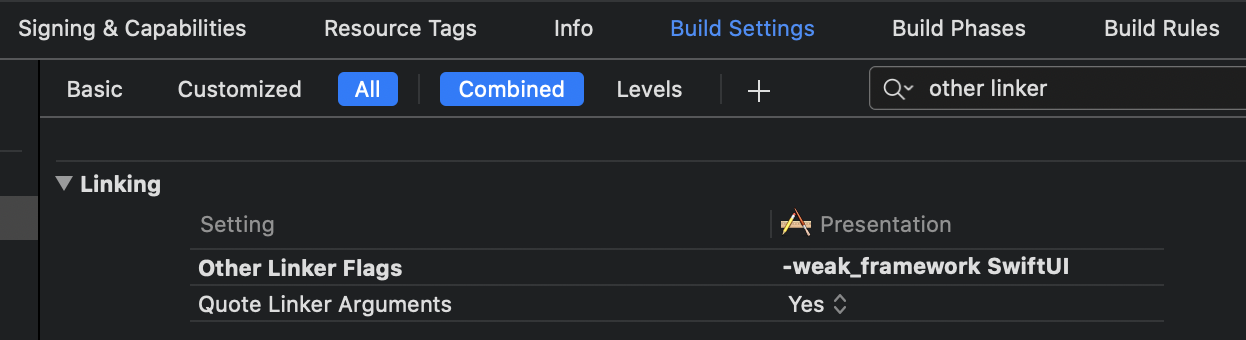
.footnote[iOS 13 Release Notes] ]
.left-column[ .font-large.grey[Live Preview]
.font-large[Fast Access] ]
.right-column[
-
Render the page directly
-
No need following steps
- Select A
- Scroll
- Click B
- ... ]
.left-column[ .font-large.grey[Live Preview]
.font-large.grey[Fast Access]
.font-large[Preview device size] ]
.right-column[
struct ContentView_Previews: PreviewProvider {
    static var previews: some View {
        ContentView()
        	.previewDevice("iPhone 11")
    }
}
]
.left-column[ .font-large.grey[Live Preview]
.font-large.grey[Fast Access]
.font-large.grey[Preview device size]
.font-large[Group Preview] ]
.right-column[
struct ContentView_Previews: PreviewProvider {
    static var previews: some View {
        Group {
            ContentView()
            	.previewDevice("iPhone SE")

            ContentView()
            	.previewDevice("iPhone 11")
        }
    }
}
]
.left-column[ .font-large.grey[Live Preview]
.font-large.grey[Fast Access]
.font-large.grey[Preview device size]
.font-large.grey[Group Preview]
.font-large[Vary Language] ]
.right-column[
struct SwiftUIText: View {
    var body: some View {
        Text("HelloKey")
    }
}
struct PreviewSwiftUIText: PreviewProvider {
    static var previews: some View {
        Group {
            SwiftUIText()
            .environment(\.locale,
                		 Locale(identifier: "en"))
            .previewDisplayName("en")

            SwiftUIText()
	        .environment(\.locale,
	            	     Locale(identifier: "ja"))
	        .previewDisplayName("ja")
        }
        .previewLayout(.sizeThatFits)
    }
}
]
.left-column[
 ]
]
.left-column[ .font-large.grey[Live Preview]
.font-large.grey[Fast Access]
.font-large.grey[Preview device size]
.font-large.grey[Group Preview]
.font-large[Vary Language] ]
.right-column[
]
.center[
 ]
]
Previews in packages always perform a full build of the active scheme. (51030302)
.footnote[Xcode 11 Release Notes]
.center[
 ]
]
Previews in packages always perform a full build of the active scheme. (51030302)
Main Scheme
.center[
 ]
]
--
Framework Scheme - Solution
.center[
 ]
]
.grey[
]
Currently Playground is more stable than SwiftUI canvas preview...
.center[
 ]
]
.left-column[ .font-large[Live View] ]
.right-column[
- Interactable ]
.left-column[ .font-large.grey[Live View]
.font-large[Fast Access] ]
.right-column[
-
Render the page directly
-
No need following steps
- Select A
- Scroll
- Click B
- ... ]
.left-column[ .font-large.grey[Live View]
.font-large.grey[Fast Access]
.font-large[Inline Display] ]
.right-column[
 ]
]
.left-column[ .font-large.grey[Live View]
.font-large.grey[Fast Access]
.font-large.grey[Inline Display]
.font-large[Run Step by Step] ]
.right-column[
- View change on the fly

.right-column[
 ]
]
???
Similar to Scripting Language
.left-column[ .font-large.grey[Live View]
.font-large.grey[Fast Access]
.font-large.grey[Inline Display]
.font-large[Run Step by Step] ]
.right-column[
- View change on the fly ] .right-column[
- Perfect for network response decoding trial ]
.left-column[ .font-large.grey[Live View]
.font-large.grey[Fast Access]
.font-large.grey[Inline Display]
.font-large.grey[Run Step by Step]
.font-large[Vary Screen Size] ]
.right-column[
viewController.preferredContentSize = Some Size]
???
No safe area...
.left-column[ .font-large.grey[Live View]
.font-large.grey[Fast Access]
.font-large.grey[Inline Display]
.font-large.grey[Run Step by Step]
.font-large.grey[Vary Screen Size]
.font-large[Vary Language] ]
.right-column[
- Use
NSLocalizedStringwith specified language sub-bundle

- To build faster at every iteration
- SUT (System Under Test) in Framework
- Start unit test in playground, move to test target for CI after completed
MyUnitTests.defaultTestSuite().run() // in playground
.center[
 .font-small[Image Source]
]
.font-small[Image Source]
]
- From Kickstarter Open Source and Speech
- All code in Framework
- Every page inspectable in playground
.center[
 ]
]
class: blank
.vertical-center.center[
]
-
The slides is made by Markdown powered by remark
-
The markdown and sample code of the slides could be found here
.center[ ]
]
- Happy Coding and Thank You